Canon PowerShot ELPH 330: Streamlined Imaging for Daily Workspaces
A dedicated compact camera for desk workspace tasks offers a focused, distraction-free tool that modern smartphones rarely match. When setting up an organized desk or managing everyday documentation, you often need an imaging device that turns on quickly, snaps crisp records of hardware, documents, or ongoing projects, and stores easily in a drawer. The Canon…
By Robert Blair
9 min read
How we write these. Every price, stock status and specification here is read from the Amazon product listing, not from hardware we tested ourselves. Scores are out of 10, based on listed specifications and buyer feedback.


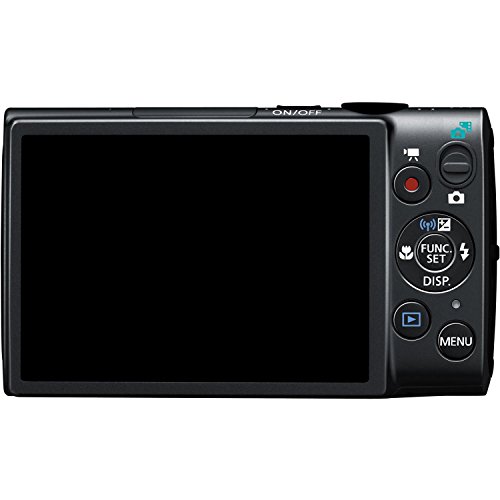
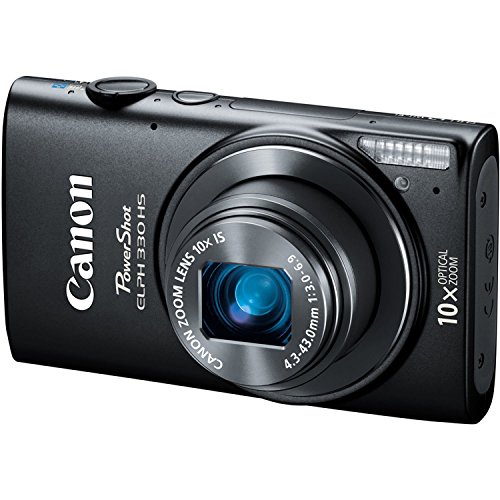
Product photos from the Amazon listing.
The product
Canon PowerShot ELPH 330 HS
Our score
8.4/10
Solid
Price not listed
- Prime eligible
- Sold by HDD Shop
Affiliate link. Price and stock come from the listing and change without notice.
As Amazon Associates, we earn from qualifying purchases. This means we may receive a small commission at no extra cost to you if you click through and make a purchase.
A dedicated compact camera for desk workspace tasks offers a focused, distraction-free tool that modern smartphones rarely match. When setting up an organized desk or managing everyday documentation, you often need an imaging device that turns on quickly, snaps crisp records of hardware, documents, or ongoing projects, and stores easily in a drawer. The Canon PowerShot ELPH 330 HS enters this role as an ultra-slim point-and-shoot equipped with a 12.1-megapixel CMOS sensor, an expansive 10x optical zoom, and integrated wireless connectivity. Rather than pulling out a multi-purpose phone filled with incoming messages and notifications, having a standalone pocket camera keeps work sessions streamlined and visual records organized.
Deciding whether this compact camera fits into your routine requires looking at how its specific hardware functions during typical office and home desk tasks. While it delivers impressive focal versatility with its 24mm wide-angle lens and Intelligent IS stabilization, certain trade-offs such as automatic exposure dependence and JPEG-only recording dictate its ideal workflow. In the sections below, we examine the camera’s full feature set, core specifications, desk usability, optical performance, battery conservation settings, and overall value for daily workspace imaging.
What You Get With the Canon PowerShot ELPH 330 HS
The product data outlines a compact imaging tool built around ease of operation and optical reach, though the listing does not specify whether supplementary boxed accessories such as a wrist strap, external charger, or memory card are included. Based purely on the manufacturer hardware specifications, the camera package centers on the black camera body and its integrated imaging systems:
In the box
- 12.1-megapixel CMOS sensor integrated with the DIGIC 5 image processor (Canon HS SYSTEM)
- 10x optical zoom lens starting at a wide 24mm focal perspective
- Intelligent IS optical image stabilization system to counter camera shake
- 3-inch rear LCD screen for framing and review
- 1080p Full HD video recording with a dedicated movie button
- High Speed AF tracking and continuous burst shooting up to 6.2 frames per second
- Built-in Wi-Fi connectivity for group and social networking photo sharing
- Smart AUTO intelligent scene detection alongside Hybrid Auto daily overview recording
- ECO Mode power-saving configuration designed to reduce overall battery drain
- Scene shooting modes with automatic and program exposure controls
Key Specifications
Specifications
- Photo Sensor Resolution
- 12.1 Megapixels
- Sensor Type and Size
- CMOS, 1/2.3-inch
- Image Processor
- DIGIC 5
- Lens Focal Reach
- 10x Optical Zoom (24mm wide-angle)
- Image Stabilization
- Optical (Intelligent IS)
- Maximum Aperture
- f/6.9
All 10 specifications
- Shutter Speed Range
- 15 seconds to 1/2000 second
- ISO Sensitivity Range
- Expanded Minimum ISO 80
- Display Monitor
- 3-inch LCD Screen
- File Format
- JPEG (Exif 2.3)
Quoted from the product listing.
Workspace Integration and Everyday Carrying
Finding a camera that seamlessly integrates into a desk workspace requires paying attention to dimensions, weight, and operational readiness. The Canon PowerShot ELPH 330 HS is designed around a classic pocketable form factor, making it compact enough to rest beside a keyboard tray or slip inside a desk drawer without creating visual clutter. For professionals handling inventory tracking, archiving physical paperwork, or cataloging incoming hardware shipments, using the Canon PowerShot ELPH 330 for office use keeps desktop documentation isolated from personal devices. When you need a photo, picking up a single-purpose camera prevents you from getting pulled into phone notifications, preserving your daily productivity.
Portability is equally critical when stepping away from the desk. As a Canon ELPH 330 HS daily carry option, the camera slides effortlessly into a shirt pocket, laptop sleeve, or briefcase compartment. Earlier compact models like the canon elph 110hs demonstrated the enduring appeal of a slender metal-accented profile, and this model continues that legacy while packing a longer zoom. Because the lens retracts flush into the body when powered down, there are no protruding barrels or delicate external components to snag on fabric during rapid transit between meetings or workstation areas.
The exterior ergonomics emphasize straightforward operation through tactile controls and a bright 3-inch LCD screen. Framing up desk layouts, whiteboards, or small assembly components is straightforward thanks to the generous screen size, which dominates the rear of the camera. The minimal button array ensures that anyone in an office environment can pick up the unit, power it on, and capture an image without needing a tutorial. While the compact chassis lacks a deep sculpted handgrip, its squared edges provide enough purchase for steady one-handed operation during rapid workspace tasks.
Optical Performance and Image Stabilization in Real Settings
The standout optical attribute of this model is the Canon ELPH 330 10x optical zoom lens, which starts at an expansive 24mm equivalent wide angle. In an office or home studio, a wide 24mm perspective allows you to capture an entire multi-monitor workstation, wide-format architectural plan, or full whiteboard from just a few feet away. When you need to document fine serial numbers on elevated network switches or inspect equipment installed across a warehouse floor, the 10x optical reach closes the distance without the pixelation common to digital magnification systems.
Optical reach is only as good as the system keeping it steady, which is where Canon PowerShot ELPH 330 image stabilization becomes indispensable. Canon’s Intelligent IS analyzes camera movement in real time, shifting optical lens elements to compensate for trembling hands or slow shutter speeds in dim boardrooms. Comparing this modern optical stability against vintage compact designs like the canon powershot sd1000 highlights how much easier it is to produce sharp, legible document scans without mounting the camera to a tabletop tripod.
It is important to recognize the physical boundaries of the lens system described in the Canon PowerShot ELPH 330 specs. The maximum aperture reaches f/6.9 at telephoto settings, meaning the lens lets in less light when fully zoomed in compared to its wide-angle state. In well-illuminated offices or under bright overhead desk lamps, the 12.1-megapixel CMOS sensor and DIGIC 5 processor handle exposures cleanly. However, in poorly lit storage rooms or shadowed cubicles, using the optical zoom may cause the camera to select slower shutter speeds, making the Intelligent IS system essential for preserving image clarity.
Automated Modes and Video Functionality
Efficiency in a work routine relies on automation that gets the shot right on the first press of the shutter. The Canon ELPH 330 Smart AUTO features analyze lighting, contrast, subject distance, and color cast against dozens of pre-programmed scene types. The camera then selects the optimal exposure and focusing parameters automatically. If you are switching from shooting a glossy paper diagram to photographing a backlit computer monitor, the camera adjusts its metering without requiring you to dive into complex software menus or tweak manual exposure settings.
For dynamic office recording, process tutorials, or quick equipment demonstrations, the Canon PowerShot ELPH 330 Full HD video mode captures clear 1080p footage. A dedicated physical movie button on the rear chassis bypasses mode dials entirely, allowing you to transition from still photography to high-definition video recording with a single press. Buyers who have tracked the evolution of this series through iterations like the canon power shot elph 360 will appreciate the consistency of Canon’s Hybrid Auto feature, which records brief video snippets before each still shot to assemble a seamless video digest of the day’s tasks.
When documenting fast-moving events, testing mechanical hardware, or capturing sequential assembly line steps, the camera’s High Speed AF and burst mode prove valuable. Delivering up to 6.2 frames per second, the burst functionality ensures that rapid motion is broken down into clear, successive frames. Supported by a shutter mechanism capable of firing between 15 seconds for long exposures and 1/2000 second for freezing quick motions, the automated tracking engine keeps visual documentation sharp and reliably sequenced.
Energy Management and File Transfer
Nothing slows down a documentation routine faster than a drained battery during an important audit or inventory check. The Canon ELPH 330 ECO Mode battery management feature actively conserves power by dimming and temporarily deactivating the 3-inch LCD monitor during periods of inactivity. As soon as you tap a control or raise the camera to frame a shot, the screen wakes up instantly. This power-conscious configuration allows the camera to remain on your desk all day, ready for intermittent photo logging without depleting its charge prematurely.
Managing captured assets is equally straightforward thanks to the camera’s file system and built-in connectivity. Images are written in standard JPEG format compliant with Exif 2.3, embedding critical capture timestamps and technical metadata directly into the image files for easy archival sorting. For users looking at newer workspace cameras like the canon powershot elph 360hs a – black, having reliable network options is a top priority. The ELPH 330 HS features enhanced built-in Wi-Fi, allowing you to send photos directly to social networking platforms or targeted group destinations, streamlining the transfer of field documentation directly into collaborative shared spaces.
Because the listing does not specify internal storage capacities or the presence of an included memory card, planning your setup requires securing an appropriate external storage card to hold your 12.1-megapixel photos and 1080p clips. The camera’s Program and Automatic exposure control systems ensure that file sizes remain consistent and easy to manage, preventing large bursts of high-resolution images from clogging up your local hard drive or corporate cloud storage accounts.
Canon PowerShot ELPH 330 HS Pros and Cons
Reasons to buy
- 10x optical zoom with 24mm wide angle
- Intelligent IS optical image stabilization
- Dedicated 1080p Full HD video recording
- Power-saving ECO Mode extends battery endurance
- Fast 6.2 fps continuous burst shooting
Reasons to avoid
- Slow f/6.9 maximum aperture at telephoto
- JPEG-only recording without RAW image support
- Listing does not specify included accessories
Check Canon PowerShot ELPH 330 HS on Amazon
Is the Canon PowerShot ELPH 330 HS Worth It
Evaluating whether this device belongs on your desk comes down to the question: is Canon PowerShot ELPH 330 worth it for your specific imaging needs? If your goal is to establish a clutter-free desk environment where equipment documentation, packaging logs, and visual notes can be captured instantly without phone notifications or battery drain, this camera serves that niche admirably. The combination of a 24mm wide perspective, a genuine 10x optical zoom, and Intelligent IS stabilization gives it functional versatility that far surpasses basic fixed-lens utility cameras.
Conversely, users looking for deep creative control, manual exposure dials, or uncompressed RAW image formats will find the camera’s automated focus restrictive. With a maximum aperture of f/6.9 at the long end of the zoom and exposure controls limited to Automatic and Program modes, the ELPH 330 HS is engineered for speed, convenience, and record-keeping rather than fine-art manual photography. It excels when treated as an efficient, reliable desk companion rather than a studio production rig.
For administrative staff, warehouse managers, facility inspectors, and home office workers seeking a lightweight, dedicated imaging tool, the Canon PowerShot ELPH 330 HS delivers dependable utility. It reliably handles daily visual logs, records smooth Full HD video overviews, and slips away into a desk organizer at the end of the workday, fulfilling the demands of a streamlined, practical workspace.
FAQ
Does the Canon PowerShot ELPH 330 HS support manual exposure controls?
The listing indicates that exposure control is handled through Automatic and Program modes, alongside various pre-set Scene modes. It does not provide full manual exposure controls such as dedicated shutter-priority or aperture-priority dials, making it best suited for point-and-shoot operation where the camera calculates optimal settings automatically.
How does ECO Mode improve operational endurance?
ECO Mode reduces the camera’s power consumption by automatically dimming and sleeping the 3-inch LCD monitor when the camera is not actively being manipulated. This power-saving profile conserves charge throughout long shifts, allowing the camera to sit ready on your desk for intermittent documentation without running the battery down quickly.
Does the camera shoot in RAW image format?
No, the technical specifications confirm that the camera saves still images exclusively in JPEG format with Exif 2.3 metadata. It does not support uncompressed RAW file recording, which keeps individual file sizes compact and immediately compatible with standard office computers and viewing software.
Where these numbers come from
- 581reviews published
- 1,398products with a score
- 1,374products with listed features
- 84brands covered
Ratings, prices, stock and specifications are read from the Amazon product listing. We do not run lab tests of our own, so scores on this site are out of 10, based on listed specifications and buyer feedback, not a verdict from a test bench. Prices change without notice — check the listing before buying.


