UGREEN Maxidok Thunderbolt 5 Docking Station Review: The Ultimate Desk Anchor?
Choosing the right desk hub depends on whether your daily workflow demands uncompromising data transfer speeds, multi-screen video routing, and consolidated cable management. The UGREEN Maxidok Thunderbolt 5 delivers an aggressive hardware baseline for power users seeking to unify their entire computing setup through a single physical cable. Built around Intel-certified Thunderbolt 5 silicon, this…
9 min read
How we write these. Every figure here — rating, price, stock and specification — is read from the Amazon product listing, not from hardware we tested ourselves. Ratings are the average left by buyers.
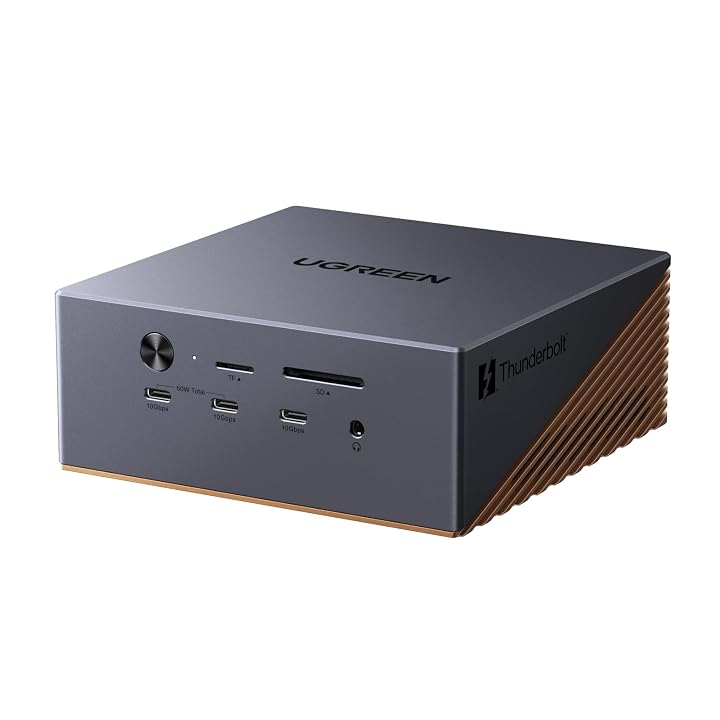


Product photos from the Amazon listing.
The product
UGREEN Maxidok Thunderbolt 5
Price not listed
- Prime eligible
- Sold by UGREEN GROUP LIMITED, shipped by Amazon
Affiliate link. Price and stock come from the listing and change without notice.
As Amazon Associates, we earn from qualifying purchases. This means we may receive a small commission at no extra cost to you if you click through and make a purchase.
Choosing the right desk hub depends on whether your daily workflow demands uncompromising data transfer speeds, multi-screen video routing, and consolidated cable management. The UGREEN Maxidok Thunderbolt 5 delivers an aggressive hardware baseline for power users seeking to unify their entire computing setup through a single physical cable. Built around Intel-certified Thunderbolt 5 silicon, this station targets creative professionals, technical power users, and multi-display desktop operators who require sustained high-bandwidth performance without juggling a messy web of disparate dongles, external drive enclosures, and auxiliary power supplies.
As the flagship model U716 in the brand’s desktop ecosystem, this unit redefines desktop expansion by pairing a massive 17-port array with an integrated M.2 NVMe storage bay and an external power infrastructure delivering 240W of total system power. Rather than functioning simply as a standard port replicator, it operates as a dedicated workstation backbone designed to handle dual 8K visual feeds, gigabyte-per-second file transfers, and high-wattage laptop charging simultaneously. The following assessment analyzes the dock’s display bandwidth capabilities, internal storage interface, peripheral distribution, thermal management systems, and real-world compatibility to help you determine if it represents the right foundation for your workstation.
What You Get With the UGREEN Maxidok Thunderbolt 5
The UGREEN Maxidok Thunderbolt 5 provides an extensive set of input and output terminals, advanced internal silicon, and dedicated chassis hardware engineered to support high-throughput workstation peripherals.
In the box
- One UGREEN Maxidok Thunderbolt 5 docking station (Model U716, Part Number 85590F)
- Intel-certified Thunderbolt 5 chipset providing up to 120Gbps bandwidth
- Integrated PCIe Gen4x4 M.2 NVMe SSD enclosure supporting drive sizes 2230, 2242, 2260, and 2280 up to 8TB capacity
- Seventeen total connection ports for comprehensive peripheral routing
- Three downstream Thunderbolt 5 ports offering high-speed daisy-chaining and display output
- Three 10Gbps USB-A peripheral ports for legacy accessories and external drives
- Three 10Gbps USB-C data ports, including two ports with 60W shared power delivery
- One dedicated DisplayPort video output interface
- Integrated 2.5GbE Ethernet port for high-speed wired local network connectivity
- Dual-slot SD and TF 4.0 memory card readers for high-speed media ingestion
- Three distinct 3.5mm audio ports for headphones, line out, and microphone setups
- Integrated AI smart cooling system driven by a 60mm ultra-thin internal fan
- Heavyweight aluminum unibody enclosure finished in matte bronze with an integrated security lock slot
- Comprehensive system power brick supplying 240W of total power delivery
- Two-year manufacturer hardware warranty coverage
Key Specifications
Specifications
- Model Number
- U716 (Mfr Part Number 85590F)
- Connection Interface
- Intel-Certified Thunderbolt 5 (Up to 120Gbps Bandwidth)
- Total Port Count
- 17 Ports
- Storage Expansion
- M.2 NVMe PCIe Gen4x4 (Sizes 2230 to 2280, Up to 8TB Capacity)
- Host Power Delivery
- Up to 140W Laptop Charging (240W Total System Power)
- Display Support (Windows)
- Triple Independent Displays (Up to Dual or Single 8K@60Hz)
All 10 specifications
- Display Support (macOS)
- Dual Independent Displays (macOS 15+ Required)
- Wired Networking
- 2.5 Gigabit Ethernet (2.5GbE RJ45)
- Chassis Build
- Aluminum Unibody with 60mm AI Smart Cooling Fan
- Operating System Support
- Windows 10 or later; macOS 15 or later
Quoted from the product listing.
Display Bandwidth and Multi-Monitor Layouts
Managing ultra-high-resolution monitors requires substantial video bandwidth, and configuring a ugreen maxidok 8k display setup takes full advantage of the 120Gbps throughput delivered by the Thunderbolt 5 generation. For Windows workstation setups running compatible hardware, the dock routes video across three independent external screens simultaneously using its two downstream Thunderbolt 5 ports alongside the dedicated DisplayPort output. Users operating high-end visual production rigs can drive either a single ultra-dense 8K display at 60Hz or dual 8K panels at 60Hz without encountering the refresh rate throttles or chroma subsampling compromises common on older desktop standards.
Display capabilities differ when integrating the ugreen maxidok thunderbolt 5 for macbook pro users. Due to operating system architectural limits, macOS supports dual external displays through the dock rather than triple independent outputs, and the connected Mac must run macOS 15 or higher to interface properly with the Thunderbolt 5 controller. When connecting multi-display setups to Apple silicon platforms such as the mac book pro m1 or modern M4 generations, users obtain pristine dual-panel canvas setups, making it an exceptional ugreen thunderbolt 5 dual monitor dock for editing suites, timeline-heavy video mastering, and technical development environments.
A critical consideration during display planning involves display cabling protocol compatibility. The dock’s built-in DisplayPort port is a standard interface that does not support DP++ (DisplayPort Dual-Mode). Consequently, you cannot use an inexpensive passive DisplayPort-to-HDMI cable to link an HDMI monitor to this port; connecting an HDMI display to the DisplayPort socket requires an active adapter. Planning your monitor cable types in advance ensures smooth multi-screen integration right out of the box.
Internal NVMe Storage Expansion and Drive Speeds
Eliminating desktop clutter is a primary operational objective of high-performance docking solutions, and the integrated ugreen thunderbolt 5 dock nvme ssd slot accomplishes this by absorbing high-speed secondary storage directly into the base unit. Underneath its aluminum access panel, the dock houses an internal M.2 NVMe slot operating over a PCIe Gen4x4 pipeline. This dedicated drive bay supports physical drive sizes across four industry standards, including 2230, 2242, 2260, and 2280 form factors, supporting capacities up to 8TB of high-speed solid-state storage.
This internal integration alters how users handle large project files, video caches, and system backups. Instead of having separate external drive enclosures tethered across your desk surface, high-bandwidth storage sits permanently inside the dock’s primary chassis. Unlike older Thunderbolt hubs such as the kensington sd5700t thunderbolt 4 docking station that required external drives to consume downstream Thunderbolt ports, this internal bay operates without stealing an external chassis connector, preserving your rear ports for cameras, capture cards, or secondary hubs.
Proper drive selection requires strict attention to physical thermal dimensions. The internal bay accommodates standard bare drives as well as drives fitted with aftermarket thermal spreaders, provided the heatsink dimensions do not exceed 12mm in total height and 24mm in width. Drives with oversized, bulky third-party finned heatsinks will not clear the protective enclosure casing. Utilizing a Gen4x4 drive within the specified dimensions creates a seamless, high-velocity local scratch disk for heavy creative suites.
Host Power Delivery and Desktop Port Distribution
Equipped with an authoritative ugreen thunderbolt 5 dock 240w power system, the hardware reserves ample electrical headroom to run demanding accessories while keeping modern power-hungry laptops topped up. The main upstream connection delivers up to 140W of dedicated laptop charging power, ensuring that high-performance mobile workstations receive sufficient energy during intensive rendering or compiling sessions. Beyond charging the primary host machine, the power subsystem allocates reliable wattage across its external connection banks, including two front-facing USB-C ports that share a 60W Power Delivery output pool to fast-charge tablets, phones, and wireless accessories.
The peripheral port distribution across this ugreen 17 in 1 thunderbolt 5 dock cleanly organizes daily desk wiring. For legacy hardware and standard peripherals, the station supplies three 10Gbps USB-A ports and three 10Gbps USB-C ports, providing uniform high-speed data transfer across the board. Audio routing is exceptionally versatile, featuring three separate 3.5mm audio jacks that allow users to permanently wire desk speakers, reference headphones, and dedicated voice microphones without continuously switching cables on the host computer.
Local data transmission relies on an integrated 2.5 Gigabit Ethernet port, delivering substantial networking throughput improvements over standard 1Gbps ports for local network transfers and network-attached storage synchronizations. Photographers and video shooters also benefit from dual SD and TF 4.0 card readers mounted right on the front edge for direct media ingestion. When evaluating ugreen maxidok thunderbolt 5 docking station specs against proprietary platform hubs like the microsoft surface docking station, this model provides universal cross-platform versatility across both modern Windows and Mac architectures.
Thermal Management and Desktop Footprint
A desktop dock operating at 120Gbps while feeding 140W of host power and housing an internal Gen4x4 SSD inevitably produces considerable heat. UGREEN addresses this thermal profile by engineering the chassis out of a solid aluminum unibody finished in a durable bronze matte coating. The aluminum shell acts as a passive heatsink, drawing radiant warmth away from the primary Thunderbolt silicon and internal drive components while resisting surface scuffs and cosmetic wear over time.
To ensure prolonged stability under heavy continuous workloads, the dock incorporates an active AI smart cooling system equipped with an ultra-thin 60mm internal fan. The cooling algorithm dynamically balances airflow based on interior component thermals to prevent thermal throttling on both the M.2 SSD and the central Thunderbolt 5 controller. The product listing clearly notes that audible fan noise is a standard operating characteristic when the unit is operating under intensive processing loads. Buyers seeking a completely fanless, dead-silent hub should factor this operational reality into their workstation acoustic planning.
In high-density commercial workspaces and studio desks, physical security is just as crucial as hardware thermals. The dock features an integrated security lock slot directly on the metal chassis, allowing you to anchor the station firmly to your furniture. In comparisons like ugreen maxidok vs caldigit docking hardware, having an integrated internal drive bay paired with an active fan cooling system provides distinct utility for sustained write operations, whereas traditional enterprise docks like the sd25tb4 docking station focus strictly on passive computing connectivity without integrated local mass storage.
UGREEN Maxidok Thunderbolt 5 Pros and Cons
Reasons to buy
- Up to 120Gbps Thunderbolt 5 bandwidth
- Internal 8TB PCIe Gen4x4 M.2 SSD slot
- Up to 140W host laptop charging
- Dual 8K display support on compatible systems
- Fast 2.5GbE integrated wired networking
Reasons to avoid
- DisplayPort lacks DP++ requiring active HDMI adapters
- Active cooling fan produces audible sound under load
- Triple display output restricted to Windows systems
Check UGREEN Maxidok Thunderbolt 5 on Amazon
Is the UGREEN Maxidok Thunderbolt 5 Worth It
Determining whether the investment fits your desk setup depends entirely on the complexity of your daily workflow. If you are a digital visual creator, software engineer, or technical specialist managing multiple 4K or 8K displays alongside massive raw file libraries, this hub serves as a central anchor that transforms your desk. The combination of 120Gbps interface bandwidth, an internal 8TB-capable M.2 drive bay, 2.5G wired networking, and 140W host charging eliminates the need for separate docks, drive enclosures, and high-wattage power supplies.
Conversely, users whose daily routines consist of general web browsing, standard office productivity software, and a single conventional 1080p or 1440p monitor will find the hardware far exceeds their actual operational requirements. The station requires a high-performance host system featuring modern Thunderbolt 4 or Thunderbolt 5 hardware to take full advantage of its throughput, and buyers who prefer completely passive, dead-silent hubs must be comfortable with the active internal cooling fan during heavy read and write cycles.
Ultimately, this ugreen maxidok u716 review reveals an ambitious, well-constructed docking station engineered for users who push their hardware to maximum limits. When asking is ugreen maxidok thunderbolt 5 worth it for demanding professional workstations, the time saved in cable management, rapid file movement, and pristine multi-display layout makes it an outstanding centerpiece for high-end workspace organization.
FAQ
Does the UGREEN Maxidok Thunderbolt 5 support triple displays on macOS?
No, the dock supports up to dual external displays when connected to a compatible Mac running macOS 15 or later. Triple independent external monitor output is supported exclusively on compatible Windows systems running Windows 10 or later over its Thunderbolt 5 and DisplayPort video channels.
How much charging wattage does the dock supply to a connected laptop?
The dock supplies up to 140W of dedicated charging power directly to the host laptop via the main upstream Thunderbolt connection, powered by the dock’s robust 240W total system power supply.
Is the internal cooling fan supposed to make noise during normal use?
Yes, the dock features an active AI smart cooling system equipped with a 60mm ultra-thin fan. The manufacturer notes that it is completely normal for the cooling fan to produce audible sound while managing internal thermals under heavy system loads and prolonged data transfers.
Where these numbers come from
- 192reviews published
- 1,398products with a buyer rating
- 1,374products with listed features
- 84brands covered
Ratings, prices, stock and specifications are read from the Amazon product listing. We do not run lab tests of our own, so a score on this site is the average rating left by buyers, not a verdict from a test bench. Prices change without notice — check the listing before buying.