Raspberry Pi 5 8GB Review: Can It Power Your Daily Workspace?
The Raspberry Pi 5 8GB brings substantial computing capability to compact home setups, functioning as a silent daily productivity terminal or an unobtrusive local service host. Choosing this specific model delivers a quad-core 2.4GHz processor paired with 8GB of system memory, giving personal workspaces enough headroom to balance multiple browser windows, document editing suites, and…
8 min read
How we write these. Every figure here — rating, price, stock and specification — is read from the Amazon product listing, not from hardware we tested ourselves. Ratings are the average left by buyers.
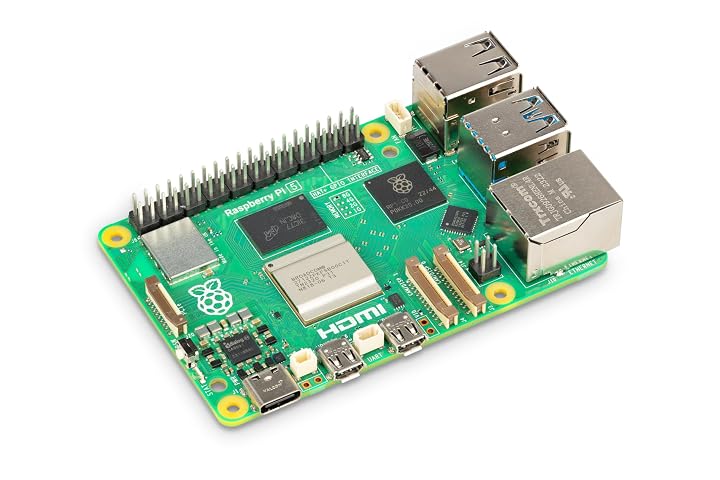


Product photos from the Amazon listing.
The product
Raspberry Pi 5 8GB
Amazon buyer rating
4.7/5
Exceptional
The listing does not publish how many buyers rated it.
Price not listed
- Prime eligible
- Sold by MemoryWhiz, shipped by Amazon
Affiliate link. Price and stock come from the listing and change without notice.
As Amazon Associates, we earn from qualifying purchases. This means we may receive a small commission at no extra cost to you if you click through and make a purchase.
The Raspberry Pi 5 8GB brings substantial computing capability to compact home setups, functioning as a silent daily productivity terminal or an unobtrusive local service host. Choosing this specific model delivers a quad-core 2.4GHz processor paired with 8GB of system memory, giving personal workspaces enough headroom to balance multiple browser windows, document editing suites, and terminal tasks without constant resource exhaustion. If you are assessing whether this compact board can replace a conventional bulky desktop or handle continuous network services, the 8GB configuration provides the memory allocation necessary to prevent aggressive swap thrashing during heavy workflows.
Integrating this board into an existing workstation requires an understanding of its physical connectivity, power needs, and storage upgrade paths. This review explores what the official hardware configuration includes, details its core processing specifications, assesses day-to-day multitasking and dual-display capabilities, and examines how the dedicated expansion bus transforms storage speed. By looking directly at hardware interfaces and real-world workspace demands, this breakdown will help you determine whether this single-board solution aligns with your desktop or micro-server goals.
What You Get With the Raspberry Pi 5 8GB
The unit provides a consolidated single-board computing architecture engineered to serve as the core engine for custom workspace builds, requiring users to supply their own peripherals and operating environment.
In the box
- Model SC1112 board featuring a quad-core ARM Cortex-A76 processor clocked at 2.4GHz
- 8GB of installed system memory for active application caching and multitasking
- Dual 4K-capable micro HDMI video outputs for multi-screen arrangements
- USB-C power input interface designed for modern desktop power delivery
- High-speed USB 3.0 ports for rapid external drive and accessory connectivity
- Integrated PCIe FPC expansion connector supporting M.2 NVMe solid-state drives via compatible adapters
Key Specifications
Specifications
- Brand
- Raspberry Pi
- Model Name
- Raspberry Pi 5
- Model Number
- Model SC1112
- Installed RAM
- 8 GB
- Memory Storage Capacity
- 8 GB listed
- CPU Architecture
- Quad-core ARM Cortex-A76
All 10 specifications
- CPU Clock Speed
- 2.4 GHz
- Display Interface
- Dual 4K micro HDMI ports
- Peripheral Ports
- High-speed USB 3.0 and USB-C power input
- Expansion Interface
- PCIe FPC connector for M.2 NVMe SSD support
Quoted from the product listing.
Everyday Desktop Performance in a Home Office
Evaluating the Raspberry Pi 5 desktop performance reveals a responsive environment suitable for common administrative tasks, writing projects, and web-based research. The quad-core ARM Cortex-A76 processor operating at 2.4GHz delivers swift application launch times and smooth scrolling through asset-heavy web pages. With 8GB of memory on tap, you can maintain numerous browser tabs alongside spreadsheet tools and text editors without observing the sluggishness common to more restricted hardware variations like the Raspberry Pi 4 1GB board.
Serving as a Raspberry Pi 5 8GB daily driver, the machine manages office collaboration tools, email clients, and remote access sessions with ease. The increased clock frequency over previous generations prevents interface hesitation when switching between active windows or playing back standard streaming media during work sessions. For home office users who value a distraction-free, low-profile footprint, it provides adequate power for administrative workflows without requiring a large computer chassis on the desk.
Demanding tasks such as heavy image manipulation, compiling large software packages, or running virtualized environments will approach the operational limits of the ARM architecture. While basic photo edits and script execution run smoothly, heavy computational duties benefit from higher resource headroom. Users anticipating extensive virtualization or enterprise container clusters may prefer evaluating higher-capacity alternatives like the Raspberry Pi 5 16G, though the 8GB baseline remains an ideal sweet spot for balanced single-user productivity.
Dual 4K Monitor Support and Workspace Ergonomics
The inclusion of dual 4K micro HDMI ports allows the device to drive two independent displays simultaneously, significantly expanding digital workspace real estate. Implementing Raspberry Pi 5 dual 4K monitors enables professionals to dedicate one screen to communication channels or reference materials while keeping a primary document or terminal open on the second. Both video outputs maintain crisp display scaling, providing clean typography and clear interface lines essential for long working hours.
Ergonomically, driving dual displays from such a tiny board transforms desk organization by freeing up physical surface area. Because the ports utilize micro HDMI rather than full-sized connectors, users must obtain appropriate adapter cables to interface with standard desktop displays, as the listing does not specify included video cords. Planning your cable routing with lightweight, flexible adapters ensures that the compact board remains flat on the desk without being lifted or tilted by rigid monitor wiring.
Driving high-resolution displays requires sustained graphic rendering throughput. The updated hardware manages desktop composition across two screens smoothly for productivity duties, document authoring, and standard browser playback. Home office users aiming to configure a tidy, dual-screen setup will find the visual layout roomy and stable for traditional office utilities, provided display refresh expectations are aligned with productivity rather than high-refresh entertainment.
Storage Expansion with PCIe NVMe SSD Drives
A major architectural advancement on this generation is the built-in PCIe expansion support routed through an onboard FPC connector. By leveraging the Raspberry Pi 5 PCIe NVMe SSD capability, home office setups can transition away from traditional microSD cards toward responsive solid-state storage. Connecting an M.2 NVMe drive using a compatible third-party adapter dramatically shortens boot sequences, accelerates large file transfers, and eliminates the data bottlenecks typical of older single-board layouts.
Using solid-state drives fundamentally alters daily desktop responsiveness. Operating system utilities open promptly, local database queries return results swiftly, and caching operations occur without noticeable interface freezes. For users working with extensive document libraries, local media archives, or code repositories, NVMe connectivity provides enterprise-level data reliability and sustained throughput directly to the core processor.
Implementing this feature requires careful hardware selection because the listing does not specify an included M.2 adapter or drive. Buyers must ensure they acquire an FPC-compatible expansion board designed to seat an NVMe drive beneath or above the main circuit board. Once installed, the system boots cleanly from the solid-state medium, creating an ultra-compact workstation with no moving parts and professional-grade storage durability.
Power Delivery and Micro Server Setup Workflows
The board relies on a dedicated USB-C power input to supply stable operational energy across the processor, peripherals, and expansion buses. Maintaining reliable power delivery is critical when attaching external accessories, as the high-speed USB 3.0 ports and the PCIe FPC interface draw power directly through the main board. Using a clean, continuous power source prevents unexpected resets during peak computational bursts or heavy external drive writing.
For technical home office users, building a Raspberry Pi 5 micro server setup provides an exceptionally efficient way to handle persistent tasks. Running automated local file backups, managing network-wide ad blocking, hosting a personal wiki, or serving local development staging environments requires minimal energy draw compared to an idling desktop tower. The 8GB RAM allocation is particularly advantageous here, permitting multiple lightweight container instances to run concurrently without memory exhaustion.
Because the unit may operate continuously in a server role, ambient thermal conditions around your desk should be considered. While the listing does not specify included heat sinks or cooling fans, keeping the board in a well-ventilated enclosure ensures sustained clock rates during extended batch processing. For lighter workloads that do not demand extensive multitasking, evaluating the smaller Raspberry Pi 5 4GB board might suffice, but the 8GB model remains the benchmark for running server utilities alongside daily background services.
Raspberry Pi 5 8GB Pros and Cons
Reasons to buy
- Quad-core 2.4GHz Cortex-A76 processor
- Generous 8GB RAM capacity
- Dual 4K micro HDMI display outputs
- Onboard PCIe FPC connector for NVMe storage
- High-speed USB 3.0 connectivity
Reasons to avoid
- PCIe SSD requires separate compatible adapter
- Power supply not specified in listing
- Requires micro HDMI cables for display
Check Raspberry Pi 5 8GB on Amazon
Is the Raspberry Pi 5 8GB Worth It
Deciding whether to incorporate this board into your daily workspace depends on your computational requirements and appetite for modular hardware configuration. The Raspberry Pi 5 8GB home office experience is ideal for users who want an unobtrusive, energy-conscious desktop for web browsing, office suites, remote administrative portals, and continuous home network management. With 8GB of memory and a 2.4GHz quad-core processor, it easily outpaces legacy micro-computers and handles modern productivity software gracefully.
If your daily workflow involves intense video rendering, commercial audio production, or native execution of legacy desktop applications designed exclusively for x86 architectures, this single-board computer will not replace a dedicated full-sized PC tower. The ARM platform requires compatible operating systems and software packages, meaning software selection must be planned around available Linux distributions and ARM-compiled binaries.
When evaluated strictly on its hardware merits, the board represents exceptional utility for minimalist workspaces, remote server terminals, and hands-on system customization. If you need a reliable micro-server engine or a space-saving workstation that sips power while driving dual monitors and high-speed NVMe storage, this hardware delivers the processing headroom and physical interfaces needed to power an efficient, uncluttered desktop.
FAQ
Does the board come with an operating system pre-installed?
The listing does not specify an included pre-loaded operating system or pre-configured storage card. Users typically download a compatible ARM operating system, such as Raspberry Pi OS or compatible Linux distributions, onto their own storage drive or microSD card to begin the initial software setup.
Can the board be powered using a standard phone charger?
While the board features a universal USB-C power input port, standard low-wattage phone chargers may not deliver adequate continuous current. To run connected USB 3.0 accessories and high-speed PCIe SSD drives reliably without voltage warnings, a dedicated power supply providing sufficient current over USB-C is recommended.
Are cables or a protective case included in the package?
The listing details the core board hardware only; it does not specify an included enclosure, micro HDMI adapter cables, power brick, or cooling fan. Buyers should plan to source an appropriate case, thermal management solutions, and video cables to match their individual desktop layout.
How do you connect an M.2 NVMe SSD to the board?
The board includes an onboard FPC connector that supplies PCIe expansion lanes. Connecting an M.2 NVMe SSD requires a compatible expansion adapter board that links to this FPC interface, allowing standard solid-state drives to mount securely and function as high-speed storage.
Can this board run two 4K screens at the same time?
Yes, the hardware includes dual 4K micro HDMI ports capable of outputting video signals to two independent monitors simultaneously, making it suitable for expanded dual-screen home office productivity environments.
Where these numbers come from
- 192reviews published
- 1,398products with a buyer rating
- 1,374products with listed features
- 84brands covered
Ratings, prices, stock and specifications are read from the Amazon product listing. We do not run lab tests of our own, so a score on this site is the average rating left by buyers, not a verdict from a test bench. Prices change without notice — check the listing before buying.


