Minisforum MS-01 Evaluation: Workstation Speed for Clean Desks
Evaluating a compact machine to replace a full desktop tower requires balancing computational throughput with peripheral expandability. The Minisforum MS-01 delivers an enterprise-inspired hardware architecture packaged inside a sleek one-kilogram chassis, explicitly targeting power users who want severe compute capabilities without sacrificing workspace minimalism. Powered by the high-performance Intel Core i9-13900H processor featuring 14 cores…
9 min read
How we write these. Every figure here — rating, price, stock and specification — is read from the Amazon product listing, not from hardware we tested ourselves. Ratings are the average left by buyers.




Product photos from the Amazon listing.
The product
Minisforum MS-01
Amazon buyer rating
4.5/5
Very good
29 ratings
Price not listed
- Sold by MINISFORUM US, shipped by Amazon
Affiliate link. Price and stock come from the listing and change without notice.
As Amazon Associates, we earn from qualifying purchases. This means we may receive a small commission at no extra cost to you if you click through and make a purchase.
Evaluating a compact machine to replace a full desktop tower requires balancing computational throughput with peripheral expandability. The Minisforum MS-01 delivers an enterprise-inspired hardware architecture packaged inside a sleek one-kilogram chassis, explicitly targeting power users who want severe compute capabilities without sacrificing workspace minimalism. Powered by the high-performance Intel Core i9-13900H processor featuring 14 cores and 20 threads, this unit stands out by offering dual 10G SFP+ networking cages alongside two 2.5G RJ45 ports. For home professionals handling extensive network storage transfers, virtualization, and multi-monitor setups, it answers whether an ultra-small form factor can genuinely manage serious enterprise workloads without the physical footprint of a standard desktop.
Because this specific version arrives as a barebone platform without pre-installed system memory, solid-state storage, or an operating system, purchasers need to anticipate hands-on hardware installation before deploying it onto their desks. This detailed Minisforum MS-01 review explores how the unit integrates into demanding home setups, analyzing its dual-channel DDR5-5200 memory support, high-capacity triple M.2 and U.2 storage expandability, low 45-watt baseline power profile, and multi-display capabilities. The following sections break down the out-of-the-box contents, technical specifications, homelab utility, workspace cable efficiency, thermal considerations, and overall workstation value to determine if this hardware fits your daily workflow.
What You Get With the Minisforum MS-01
The barebone package provides the essential foundational chassis, specialized cooling accessories, and conversion hardware necessary to construct a custom-configured micro workstation.
In the box
- 1x MS-01 MiniWorkStation chassis
- 1x U.2 to M.2 conversion adapter for enterprise drive compatibility
- 1x dedicated SSD heat sink for thermal dissipation
- 1x power adapter and matching regional power cord
- 1x HDMI cable for external monitor connectivity
- 1x complete screw set for internal mounting
- 1x user manual detailing hardware installation guidelines
Key Specifications
Specifications
- Processor
- Intel Core i9-13900H (14 cores, 20 threads, up to 5.4 GHz, 7nm SuperFin hybrid architecture)
- Graphics
- Integrated Intel Iris Xe Graphics (1.5 GHz) with support for discrete graphics cards
- Memory Architecture
- Two DDR5-5200 slots (barebone, RAM not included)
- Storage Interface
- 3x SSD slots (PCIe 4.0 M.2 2280, RAID0/RAID1 support, U.2 drive compatible via included adapter)
- Networking Ports
- Two 10G SFP+ ports (link aggregation supported) and two 2.5G RJ45 LAN ports
- Video Output Interfaces
- One HDMI port (4K at 60Hz) and two USB4 ports (8K at 30Hz or 4K at 144Hz)
All 10 specifications
- Expansion Slots
- Two total expansion slots with PCIe expansion support
- Security Architecture
- Hardware-level security features compatible with Intel vPro
- Chassis and Power
- Black finish, 1 kg weight, active fan cooling, 45-watt power consumption profile
- Operating System Support
- No operating system pre-installed; supports Windows
Quoted from the product listing.
High-Speed Networking and Homelab Workloads
The primary draw for technical professionals is the unusual networking layout integrated into this chassis. Outfitted with dual 10G SFP+ cages and two 2.5G RJ45 ports, the unit provides bandwidth capabilities typically reserved for rack-mounted server hardware. For users configuring the Minisforum MS-01 for homelab environments, this physical layout allows dedicated multi-gigabit routing, high-speed virtual machine clusters, and direct links to enterprise network-attached storage arrays. Link aggregation support on the 10G SFP+ ports allows data-heavy home labs to achieve bonded throughput, eliminating the interface bottlenecks common to standard commercial mini PCs.
Network isolation is simplified by having four physical Ethernet interfaces available simultaneously. Home office engineers can designate the dual 2.5G ports for standard LAN access and administrative management while isolating the dual 10G SFP+ interfaces for hypervisor traffic, iSCSI storage targets, or container clustering. This segregation guarantees that background file syncs and heavy database read operations do not interfere with routine day-to-day office communications or active video conference calls.
Compared to smaller everyday platforms such as the minisforum m1 pro, the MS-01 is explicitly tailored toward users who need advanced interface connectivity rather than casual web browsing. The inclusion of enterprise-ready SFP+ cages means you can use direct attach copper cables or optical transceivers to connect directly into managed switches, bypassing intermediate adapters and keeping your physical desk footprint organized.
Triple Display Productivity and Desk Cable Management
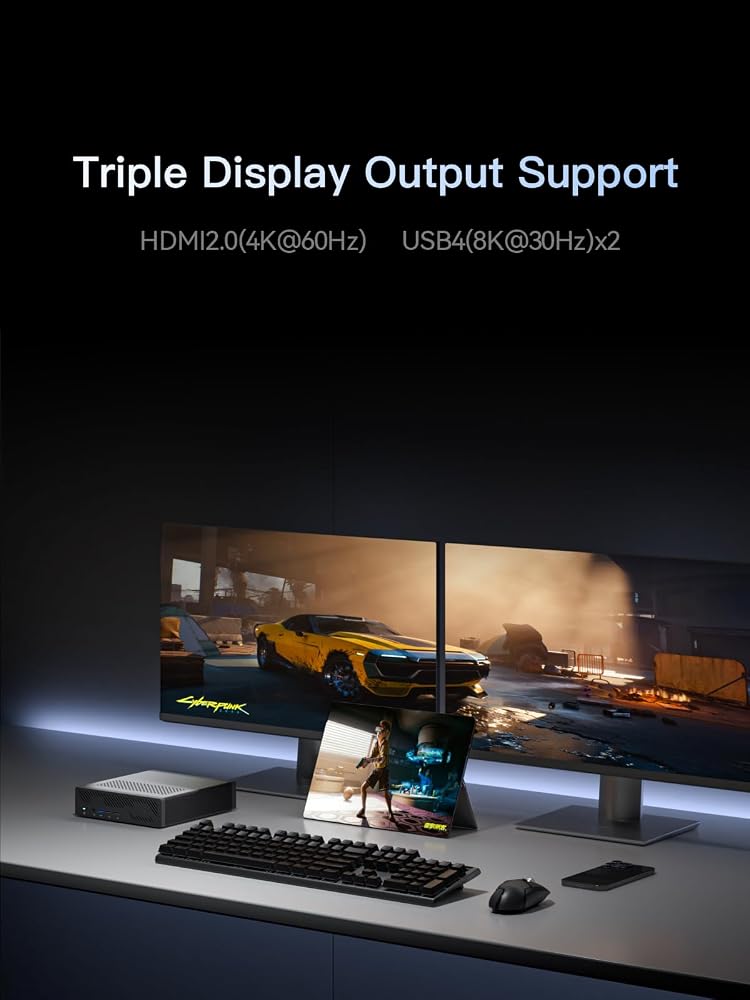
Managing an efficient multi-monitor workflow without creating a tangled web of desk wiring is a continuous challenge for remote workers. The Minisforum MS-01 addresses visual workspace demands through a triple-display configuration consisting of one HDMI port and two high-bandwidth USB4 ports. The HDMI connection supports standard 4K output at 60Hz, while the dual USB4 ports support up to 8K resolution at 30Hz or high-refresh-rate 4K output at 144Hz. This arrangement enables users to run high-density code editors, broad analytical spreadsheets, and design dashboards side by side across independent panels.
The physical design of the unit aids in maintaining an uncluttered workspace. Weighing just one kilogram, the black enclosure can sit unobtrusively beneath a monitor riser or tucked neatly beside a monitor arm. Because the dual USB4 ports carry both high-speed data and modern video signals, cabling runs are streamlined. Users can connect modern USB4 displays directly to the computer, minimizing the need for bulky external docking stations or multiple intermediate video converters.
For creative and technical roles where monitor real estate directly influences daily output, this multi-display flexibility is invaluable. Running complex multi-window applications side-by-side matches the performance benchmarks seen on high-end configurations like modern amd ai max builds, while retaining the form factor of a desk-friendly workstation. The integrated Intel Iris Xe Graphics running at 1.5 GHz ensures smooth UI rendering across all connected panels during standard productivity, video conferencing, and business tasks.
Hardware Configuration and Expansion Logistics
Adopting a barebone platform means the initial deployment requires sourcing and installing several core components. Completing the Minisforum MS-01 barebone setup involves installing your own DDR5 SODIMM memory and solid-state storage before booting the system. The internal motherboard features two DDR5-5200 memory slots, allowing builders to choose capacity levels tailored to heavy virtualization, local database hosting, or extensive multi-tasking. The listing indicates support for Windows, though users must install and license their preferred operating system independently.
Internal storage expandability is one of the strongest Minisforum MS-01 specs. The chassis accommodates three SSD slots using the M.2 2280 PCIe 4.0 standard, with built-in compatibility for RAID0 and RAID1 configurations. In addition to standard NVMe drives, the included conversion adapter allows the system to accept enterprise-grade U.2 solid-state drives. As specified in the listing, utilizing U.2 enterprise storage allows users to achieve high capacities such as 7.68 TB, 15.36 TB, or more on the same four PCIe lanes, turning this compact chassis into a high-density local storage node.
Physical expandability extends further with two expansion slots that provide Minisforum MS-01 PCIe expansion capabilities. The internal architecture includes support for discrete graphics cards, enabling users to insert compatible add-in cards when workloads require dedicated graphical or compute acceleration beyond the integrated Iris Xe engine. While smaller ultra-compact options like the minisforum x1 lite prioritize absolute space reduction, the MS-01 provides the internal expansion headroom necessary for modular, long-term workstation utility.
Thermal Performance and Daily Power Consumption
High-density compute hardware inside a compact enclosure requires disciplined thermal management. The Minisforum MS-01 i9 13900H processor utilizes a hybrid architecture built on a 7nm SuperFin improved process, packing 14 cores and 20 threads into a compact die. Under heavy computational cycles, such as local code compilation or container build tasks, the internal fan cooling system engages actively to extract heat from the CPU and internal drive bays. Minisforum also includes a dedicated SSD heat sink in the box to prevent thermal throttling on high-speed PCIe 4.0 storage.
Energy management remains efficient despite the workstation classification, with the listing reporting a power consumption baseline of 45 watts. This low power consumption allows the unit to run continuously as an always-on home server or network hub without generating the substantial ambient heat and electric overhead associated with standard full-sized tower desktops. The active fan cooling system maintains operational stability during sustained workloads, ensuring that internal temperatures remain within safe operating thresholds.
System reliability is complemented by hardware-level security features compatible with Intel vPro. This integration enables enterprise-grade stability, hardware monitoring, and administrative security suited for distributed office environments. For remote operators who leave their machine active around the clock for background data processing, remote access, or virtualization hosting, these security features provide administrative peace of mind without requiring custom third-party monitoring appliances.
Minisforum MS-01 Pros and Cons
Reasons to buy
- Intel Core i9-13900H with 14 cores
- Dual 10G SFP+ ports with link aggregation
- Triple display output via HDMI and dual USB4
- Three SSD slots supporting M.2 and U.2
- PCIe expansion supporting discrete graphics cards
Reasons to avoid
- Barebone design requires buying RAM, SSD, and OS
- SFP+ optical transceivers and cables sold separately
- Active cooling fan required for sustained loads
Check Minisforum MS-01 on Amazon
Is the Minisforum MS-01 Worth It
Determining whether the Minisforum MS-01 mini workstation is the right investment comes down to your technical requirements and comfort with DIY system assembly. For homelab experimenters, network engineers, and advanced desk workers who require multi-gigabit routing, 10G SFP+ connectivity, and enterprise U.2 storage expandability, this hardware delivers exceptional utility in a one-kilogram package. It bridges the gap between commercial mini PCs and full-sized enterprise servers, allowing power users to eliminate noisy, space-consuming desktop towers from their home workspaces.
However, this machine is not suited for users seeking an unbox-and-play experience. Because it arrives without RAM, an SSD, or an operating system, buyers must factor in the time and additional hardware needed to source and install components. Users whose daily routines revolve around simple word processing, basic web browsing, or casual streaming will find the dual 10G SFP+ ports, RAID configurations, and 14-core processing power far beyond their actual operational needs.
If you have the technical knowledge to assemble your own memory and storage array, and you can actively capitalize on dual 10G networking and triple monitor support, the Minisforum MS-01 stands as one of the most capable and flexible micro workstations on the market today. It brings enterprise networking directly to your desktop while preserving a clean, minimalist workspace.
FAQ
What components are required to complete the Minisforum MS-01 barebone setup?
Because the barebone version does not ship with memory, storage, or software, you must supply and install compatible DDR5-5200 SODIMM RAM, at least one M.2 2280 PCIe 4.0 or U.2 solid-state drive, and install your own operating system such as Windows.
How does the Minisforum MS-01 handle enterprise U.2 storage drives?
The package includes a specialized U.2 to M.2 conversion adapter. This hardware allows users to install high-capacity enterprise-grade U.2 solid-state drives, which can reach capacities of 7.68 TB, 15.36 TB, or higher, running over four PCIe lanes with support for RAID0 and RAID1 modes.
Can the Minisforum MS-01 output to multiple displays at the same time?
Yes. The unit features triple video outputs, including one HDMI port supporting 4K at 60Hz and two USB4 ports supporting 8K at 30Hz or 4K at 144Hz, allowing you to connect up to three external displays simultaneously.
Does the Minisforum MS-01 support discrete graphics cards?
Yes. The listing specifies that the chassis features two total expansion slots with PCIe expansion support, allowing the system to accommodate compatible discrete graphics cards alongside its integrated Intel Iris Xe Graphics engine.
What buyers wrote
Quoted word for word from Amazon reviews. We did not edit them.
I have two of these in a proxmox cluster. I added 64 GB of RAM and a 4TB NVME and smaller NVME for the boot drive. Both SFP+ ports are being used one for VMs and one for NFS storage. Connectivity and stability have been rock…
I've been using this system for about a month now, and I'm really pleased with its performance. It replaced an older tower-case system as my main workstation. Once it's up and running, the system operates smoothly and handles demanding tasks without a hitch. I decided to…
Where these numbers come from
- 192reviews published
- 1,398products with a buyer rating
- 1,374products with listed features
- 84brands covered
Ratings, prices, stock and specifications are read from the Amazon product listing. We do not run lab tests of our own, so a score on this site is the average rating left by buyers, not a verdict from a test bench. Prices change without notice — check the listing before buying.


