VITURE Luma Ultra XR Glasses: Practical Workspace & Gaming Upgrade
Deciding whether wearable displays can genuinely replace physical desk monitors requires looking beyond marketing claims to examine text readability, spatial tracking precision, and daily ergonomics. The VITURE Luma Ultra enters the extended reality market as a dedicated optical upgrade designed for mobile workstations and high-fidelity entertainment. Centered around a 152-inch virtual display powered by Sony…
10 min read
How we write these. Every figure here — rating, price, stock and specification — is read from the Amazon product listing, not from hardware we tested ourselves. Ratings are the average left by buyers.




Product photos from the Amazon listing.
The product
VITURE Luma Ultra
Amazon buyer rating
5.0/5
From only 3 ratings — too few to call it good or bad.
Price not listed
- Sold by VITURE US, shipped by Amazon
Affiliate link. Price and stock come from the listing and change without notice.
As Amazon Associates, we earn from qualifying purchases. This means we may receive a small commission at no extra cost to you if you click through and make a purchase.
Deciding whether wearable displays can genuinely replace physical desk monitors requires looking beyond marketing claims to examine text readability, spatial tracking precision, and daily ergonomics. The VITURE Luma Ultra enters the extended reality market as a dedicated optical upgrade designed for mobile workstations and high-fidelity entertainment. Centered around a 152-inch virtual display powered by Sony Micro-OLED panels, a 1200p native resolution, and 1500 nits of peak luminance, this wearable display targets remote professionals and console enthusiasts who need expansive screen real estate without cluttering a physical room.
Integrating augmented reality into a daily routine involves balancing visual sharpness against hardware compatibility and software maturity. This evaluation explores how the hardware performs across daily desktop computing, laptop multitasking, and portable gaming. We analyze the technical specifications, the SpaceWalker software integration across desktop operating systems, tracking mechanics, and audio clarity. Whether you are seeking a distraction-free display for an apple mac studio m5 ultra desk environment or evaluating a streamlined travel display, this overview details everything you should know before buying.
What You Get With the VITURE Luma Ultra
The VITURE Luma Ultra hardware package integrates dedicated spatial awareness hardware and high-grade optics into a modern, rectangular eyewear form factor. The listing details several advanced features and core display components engineered for hybrid productivity and entertainment workflows.
In the box
- Dual Sony Micro-OLED displays delivering a virtual 152-inch screen diagonal with a crisp 1200p resolution.
- High-speed 120Hz refresh rate ensuring fluid cursor movements, window navigation, and fast gaming frame rates.
- Luminance output peaking at 1500 nits to maintain legibility in naturally lit home offices and bright living rooms.
- Spatial sensor array featuring one front RGB camera alongside dual depth cameras for physical space detection.
- Full 6DoF positional tracking and responsive hand gesture control when connected to the VITURE Pro Neckband.
- Electrochromic dimming lenses that change tint at the touch of a button to block background ambient light.
- Integrated diopter dials supporting native myopia adjustment up to -4.0D without requiring secondary prescription inserts.
- HARMAN-tuned open-ear acoustic system paired with an embedded microphone for hands-free audio and calls.
- SpaceWalker application compatibility enabling 3DoF, multi-display virtual desktops, ultra-wide view, and One-Click 3D.
- Dynamic RGB light accents integrated into a lightweight, modern rectangular frame finished in black.
- Direct USB-C video input compatibility with iPhone 15, 16, and 17 series smartphones, as well as PC handhelds.
Key Specifications
Specifications
- Model Name
- V1252
- Display Panel Type
- Sony Micro-OLED
- Virtual Display Dimensions
- 152 inches
- Native Screen Resolution
- 1200p
- Maximum Display Brightness
- 1500 nits
- Display Refresh Rate
- 120Hz
All 10 specifications
- Optical Myopia Adjustment
- Built-in adjustment up to -4.0D
- Integrated Sensors
- 1 Front RGB Camera, Dual Depth Cameras
- Audio and Input System
- HARMAN-Tuned Open-Ear Speakers, Microphone, Hand Gesture Support
- Ecosystem Memory & Storage
- 12 GB RAM, 12 GB Storage Capacity
Quoted from the product listing.
Display Sharpness and Visual Ergonomics for Productivity
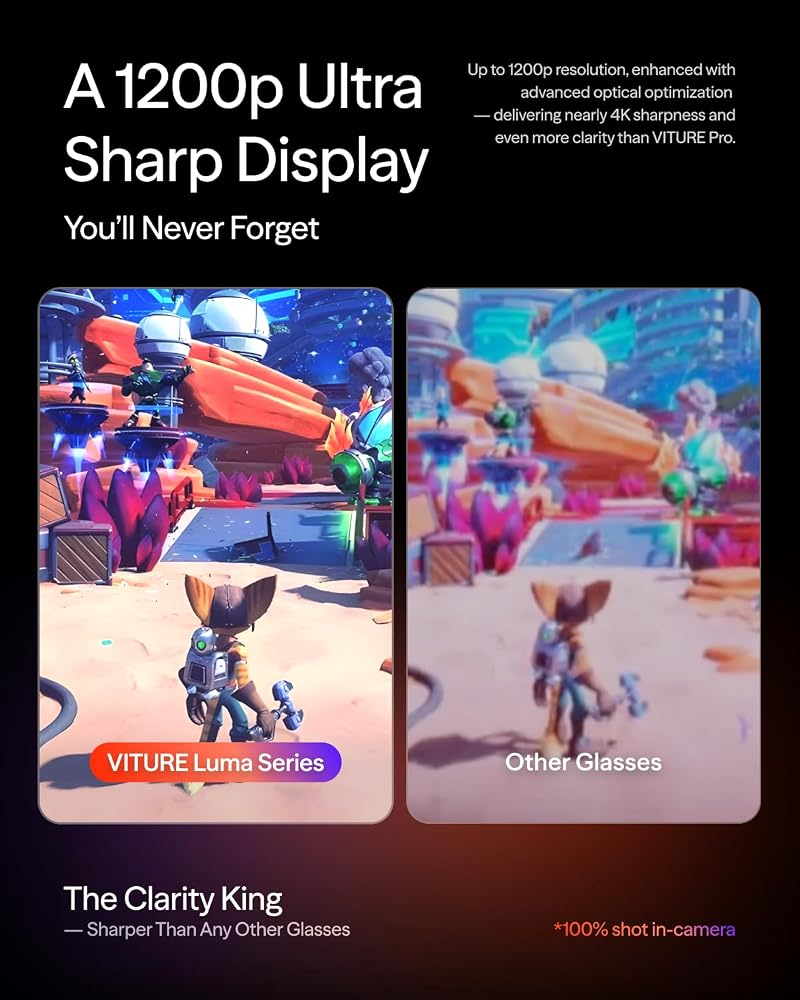
When selecting the viture luma ultra for productivity, visual clarity is the most crucial consideration. Standard 1080p augmented reality glasses often struggle with rendering tiny text, resulting in color fringing or softened window boundaries when reading code, spreadsheets, or long-form documentation. The VITURE Luma Ultra addresses this limitation by deploying Sony Micro-OLED displays with a native 1200p resolution. This subtle increase in vertical pixel density delivers clean font rendering with zero blurry edges, allowing users to keep full-sized desktop interfaces open without straining to decipher microscopic interface text.
Screen brightness is another common failure point for wearable displays in daylight office setups. The 1500 nits maximum display brightness ensures that visual contrast remains prominent even when sitting near uncovered windows. Paired with a 120Hz refresh rate, standard computing actions like scrolling through complex data sheets, resizing multiple application windows, and dragging terminals across the screen feel remarkably smooth. The expansive 152-inch virtual field of view eliminates the constricted sensation common in smaller portable monitors, transforming cramped laptop environments into comprehensive digital workspaces.
Ergonomics in high-focus environments are reinforced by electrochromic dimming technology. Instead of forcing users to attach clunky snap-on plastic light shields, the glasses incorporate dynamic electrochromic lenses. A quick tap activates the tinting layer, instantly shifting the view from transparent room awareness to a darkened, high-contrast cinema canvas. This instant immersion mechanism keeps distracting office movements out of your peripheral field of view while you stay locked into intensive development or writing sessions.
Multi-Screen Workspaces and 6DoF Tracking Capabilities
Achieving an efficient luma ultra xr glasses multi-screen setup depends largely on how physical movements translate into virtual screen stability. Through the proprietary SpaceWalker application, the VITURE Luma Ultra unlocks a multi-screen workspace that organizes multiple virtual monitors in horizontal or ultra-wide configurations. Rather than merely mirroring a single laptop screen, users can float multiple distinct workspaces side by side in virtual space, pin them to specific coordinates, and toggle smooth 3DoF head-tracking to glance between windows naturally.
Where the hardware separates itself from simpler display glasses is the inclusion of dedicated spatial awareness hardware. Equipped with a front RGB camera and dual depth cameras, the glasses feature true 6DoF tracking capabilities. As noted in the listing details, full 6DoF tracking and responsive hand gesture controls are operational when the glasses are paired with the VITURE Pro Neckband. Furthermore, the SpaceWalker software on both macOS and Windows currently supports 6DoF tracking, while hand gesture tracking for desktop platforms is slated for a future update. For buyers looking for a detailed technical perspective, reading a dedicated viture luma ultra review helps illustrate how these tracking modes behave during extended desk work.
Understanding these software tiers is vital for setting realistic expectations. When connected directly to a computer without specialized drivers, the glasses operate primarily as a static high-resolution wearable display. Once you initiate the viture luma ultra spacewalker application, the headset taps into its sensor suite to stabilize displays against head movement. This capability prevents motion sickness during long working sprints, as the monitors stay fixed in your digital perimeter rather than bouncing along with every head twitch.
Device Compatibility and Mobile Gaming Setup
Beyond traditional desktop tasks, the hardware functions seamlessly as a versatile luma ultra xr glasses gaming setup. Modern portable PC handhelds such as the Steam Deck, ASUS ROG Ally, and Lenovo Legion Go can output video directly over a standard DisplayPort-enabled USB-C connection. Plugging the glasses into these consoles immediately projects a massive 152-inch theater display in front of the player, completely bypassing the smaller built-in 7-inch or 8-inch handheld screens.
The combination of a 120Hz panel and Sony Micro-OLED color reproduction dramatically improves portable gaming experiences. Handheld games that feature tiny user interfaces, dense inventory menus, or complex subtitling become easily readable on the virtual panel. Darker game environments benefit from the Micro-OLED pixel-level contrast, where blacks remain deeply inked rather than washed out by backlights. Because the glasses draw minimal overhead and display high-refresh imagery effortlessly, fast-paced action titles maintain responsive frame pacing.
For home console gaming, the hardware connects through the optional VITURE Pro Mobile Dock. The dock provides HDMI inputs for connecting traditional consoles like Nintendo Switch, PlayStation, or Xbox, while simultaneously allowing power passthrough to charge your host device during marathon play sessions. Gamers on the move can also integrate the VITURE Pro Neckband, which adds standalone wireless operation, pre-installed media apps, an AI assistant, and a 3D media player supported by 12 GB of internal memory and 12 GB of RAM capacity.
Audio Fidelity, Optical Dials, and Daily Wearability
A primary friction point with smart eyewear is how they accommodate prescription wearers and deliver audio without causing ear fatigue. The VITURE Luma Ultra integrates rotary diopter dials directly into the top of the chassis. These dials provide native myopia adjustment up to -4.0D, allowing nearsighted individuals to dial in visual sharpness independently for each eye without purchasing or swapping magnetic prescription lenses. For users with higher myopia degrees or severe astigmatism, custom prescription clip-ons remain necessary, as documented by the manufacturer.
Sound delivery is handled through an integrated open-ear acoustic setup tuned by HARMAN. Rather than forcing you to wear in-ear buds during working hours, the speakers project directional spatial sound toward your ears while leaving your ear canals open. This configuration is exceptionally useful for a viture luma ultra home office display, allowing you to attend video conferences, listen to media, or monitor notifications while remaining fully aware of doorbells, family members, or colleagues.
The overall frame construction retains a modern rectangular aesthetic finished in clean black, complete with subtle dynamic RGB lighting effects. The built-in microphone captures vocal input cleanly for voice chats and system commands. As covered in our comprehensive luma ultra glasses analysis, the balance between optical adjustments, open acoustic awareness, and lightweight styling makes this frame significantly more practical for prolonged daily wear than bulky virtual reality headsets.
Smartphone Workflows and iOS Integration
Mobile professionals often need to work straight from their phones without booting up a laptop. The VITURE Luma Ultra offers plug-and-play video mirroring with modern smartphones supporting DisplayPort over USB-C, including the iPhone 15, iPhone 16, and iPhone 17 series. Plugging directly into a supported phone instantly casts streaming platforms, documents, photo galleries, and web browsers onto the 152-inch virtual display.
To access enhanced multi-window productivity and spatial pinning on Apple mobile hardware, specific accessory requirements apply. While standard video playback works immediately over USB-C, unlocking the complete SpaceWalker experience on iOS devices requires pairing with the USB-C XR Charging Adapter Ultra. This upcoming accessory enables specialized features such as multi-screen organization, rotational 3DoF pinning, and simultaneous charging during phone-driven work sessions.
This smartphone synergy bridges the gap between field mobility and desk-level viewing. Whether reviewing presentation decks on a train or editing notes in an airport lounge, the glasses eliminate the ergonomic strain of looking down at a handheld phone screen for hours. By elevating your posture and expanding your visual workspace to a private 152-inch canvas, mobile computing feels significantly closer to a dedicated desktop station.
VITURE Luma Ultra Pros and Cons
Reasons to buy
- Sharp 1200p Sony Micro-OLED display
- Bright 1500 nits peak luminance
- Fluid 120Hz gaming refresh rate
- Built-in -4.0D myopia adjustment
- Instant electrochromic lens dimming
- RGB camera and dual depth sensors
Reasons to avoid
- Full hand gestures require Pro Neckband
- Full iOS XR features need adapter
- Prescriptions beyond -4.0D need inserts
Check VITURE Luma Ultra on Amazon
Is the VITURE Luma Ultra Worth It
Evaluating whether this display wearable fits your daily routine depends on how you balance mobility against software modularity. If you are a mobile professional, remote worker, or portable console gamer who frequently travels and demands a high-clarity monitor replacement, the hardware delivers exceptional value. The combination of a 1200p Sony Micro-OLED panel, 1500 nits brightness, 120Hz refresh rate, and built-in myopia adjustment sets a high standard for optical clarity and eliminates the standard visual compromises of compact travel displays.
Conversely, shoppers seeking a self-contained, completely wire-free spatial headset straight out of the box must realize that the ecosystem relies heavily on connected hosts and dedicated accessories. To leverage the full suite of 6DoF hand gesture controls, you must integrate the VITURE Pro Neckband, while iOS multi-display features require the specialized charging adapter. If your primary goal is simple desktop screen expansion via Windows or macOS, the SpaceWalker multi-screen capabilities provide immediate utility without requiring extra hardware.
For consumers seeking an agile, sharp, and highly customizable personal screen that transitions effortlessly from multi-monitor spreadsheets to handheld gaming, the VITURE Luma Ultra represents an outstanding leap forward in wearable display technology. Its superior text legibility, electrochromic light shielding, and forward-looking spatial tracking sensors make it one of the most capable smart glasses currently available for modern computing setups.
FAQ
Does the VITURE Luma Ultra have built-in prescription adjustment?
Yes, the glasses feature built-in rotary myopia adjustment dials that accommodate nearsighted vision up to -4.0D. Users within this range can adjust visual clarity directly on the frame without wearing contact lenses or installing secondary inserts. For users with astigmatism or prescriptions exceeding -4.0D, optional custom prescription lens inserts are required.
Can I use the glasses with an iPhone?
Yes, the glasses can display video directly from USB-C video-output enabled iPhones, including the iPhone 15, iPhone 16, and iPhone 17 series. To access the full SpaceWalker XR multi-screen software suite on iOS devices, users must pair the glasses with the upcoming USB-C XR Charging Adapter Ultra.
Can the glasses connect directly to gaming handhelds?
The VITURE Luma Ultra connects directly over USB-C to handheld gaming consoles that support DisplayPort Alternate Mode, such as the Steam Deck, ASUS ROG Ally, and Lenovo Legion Go. This connection instantly projects games onto a virtual 152-inch screen at 120Hz without requiring external power bricks or display converters.
Do I need external headphones while wearing the glasses?
No, the frame incorporates built-in open-ear speakers custom-tuned by HARMAN along with an integrated microphone. The speakers deliver clear directional sound while preserving your awareness of external surroundings, eliminating the need for separate earbuds during gaming or video meetings.
What buyers wrote
Quoted word for word from Amazon reviews. We did not edit them.
These are my first smart glasses, and I’ve been using them for about two weeks now. To be honest, my purchase was a little impulsive after watching several reviews online. So when I first received them, I wasn’t sure whether I should keep them, especially considering…
I'm incredibly impressed with these Luma Ultra XR glasses! I love them. The screen is bright and clear, delivering an immersive experience that makes watching TV, playing games, and watching movies much more enjoyable. The picture is extremely smooth, and the lightweight design makes them very…
Where these numbers come from
- 192reviews published
- 1,398products with a buyer rating
- 1,374products with listed features
- 84brands covered
Ratings, prices, stock and specifications are read from the Amazon product listing. We do not run lab tests of our own, so a score on this site is the average rating left by buyers, not a verdict from a test bench. Prices change without notice — check the listing before buying.


