Lenovo Legion 5i RTX 5070: Can It Power Your Workday and Desk Setup?
Searching for a machine that bridges the gap between intense workplace task management and high-end graphical output often leads straight to the Lenovo Legion 5i. Equipped with an Intel Core Ultra 7 255HX processor and an NVIDIA GeForce RTX 5070 dedicated graphics card, this configuration aims to be a singular desk centerpiece that replaces both…
10 min read
How we write these. Every figure here — rating, price, stock and specification — is read from the Amazon product listing, not from hardware we tested ourselves. Ratings are the average left by buyers.
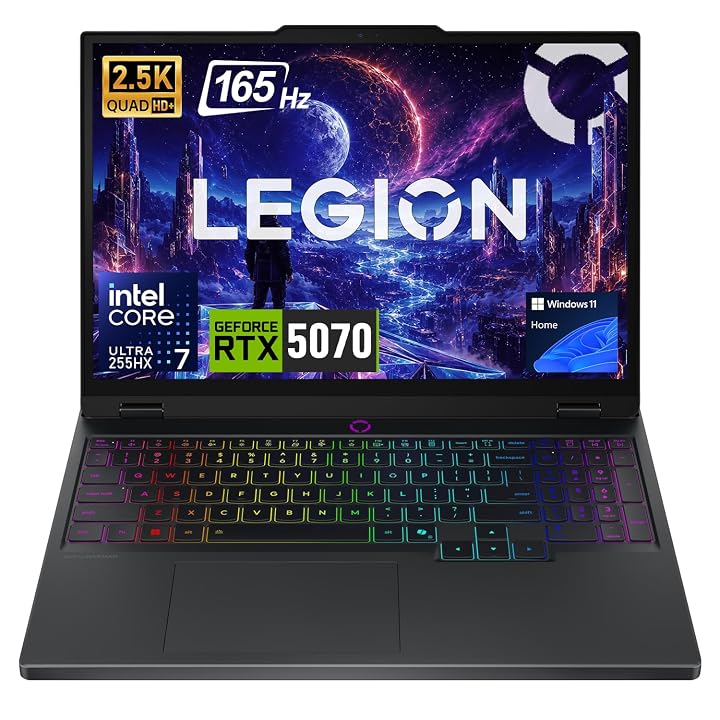


Product photos from the Amazon listing.
The product
Lenovo Legion 5i
Amazon buyer rating
4.6/5
Very good
The listing does not publish how many buyers rated it.
Price not listed
- Sold by PCOnline US
Affiliate link. Price and stock come from the listing and change without notice.
As Amazon Associates, we earn from qualifying purchases. This means we may receive a small commission at no extra cost to you if you click through and make a purchase.
Searching for a machine that bridges the gap between intense workplace task management and high-end graphical output often leads straight to the Lenovo Legion 5i. Equipped with an Intel Core Ultra 7 255HX processor and an NVIDIA GeForce RTX 5070 dedicated graphics card, this configuration aims to be a singular desk centerpiece that replaces both an office tower and a separate gaming rig. Shoppers considering this build need to know whether its balance of mobile hardware, thermal footprint, and port connectivity truly sustains an intensive workday followed by evening gaming. Rather than an ultra-slim travel notebook, this machine is designed for stationary desk dominance where continuous performance matters significantly more than shaving ounces off a commuter bag.
In this detailed overview, we examine how the hardware assembly fits into practical workspace arrangements, evaluate the upgraded internal components, and examine whether its operational profile complements your daily routine. We will analyze the physical dimensions of the chassis, examine port distribution for external peripherals, verify display utility, and explore how the 20-core processor handles concurrent enterprise software suites. By unpacking the real-world utility of the hardware specifications, this review will help you decide whether bringing this system to your workstation is the right investment.
What You Get With the Lenovo Legion 5i
The package centers around a performance-oriented black notebook configured with upgraded memory and storage components to maximize productivity out of the box. Because the listing represents a professionally upgraded configuration by PCOnline, the original factory seal is opened prior to delivery specifically to install higher-capacity memory and solid-state hardware, which is backed by a designated three-year coverage plan for the upgraded components alongside the standard one-year manufacturer coverage for remaining parts.
In the box
- Lenovo Legion 5i notebook chassis in a black finish
- Intel Core Ultra 7 255HX 20-core processor running up to 5.20 GHz
- Dedicated NVIDIA GeForce RTX 5070 graphics processor with 8GB DRAM
- 32GB high-speed DDR5 system memory
- 1TB PCIe M.2 solid-state drive
- 15.1-inch WQXGA 2560×1600 non-touch display with a 165Hz refresh rate
- Integrated stereo sound system and built-in microphone array
- Full-sized backlit keyboard with an integrated numeric keypad
- Internal 80Wh battery system with intelligent power management
- Versatile port selection including USB-C, USB-A, and HDMI outputs
- Genuine Microsoft Windows 11 Home operating system pre-installed
Key Specifications
Specifications
- Processor
- Intel Core Ultra 7 255HX (20 Cores, Up to 5.20 GHz, Smart AI Capabilities)
- Graphics Card
- NVIDIA GeForce RTX 5070 Dedicated GPU (8GB DRAM)
- System Memory
- 32GB DDR5 RAM
- Internal Storage
- 1TB PCIe M.2 SSD
- Display Panel
- 15.1-inch WQXGA (2560 x 1600), Non-Touch, 165Hz Refresh Rate
- Battery Capacity
- 80Wh Battery System
All 10 specifications
- Operating System
- Windows 11 Home
- Dimensions
- 13.58 inches (L) x 10.05 inches (W) x 0.85 inches (Th)
- Keyboard Features
- Backlit Keybed with Dedicated Numeric Keypad
- Connectivity Ports
- USB-C, USB-A, and HDMI Video Output
Quoted from the product listing.
Desk Setup Integration and Workspace Cable Management
Designing an efficient workstation requires calculating how much surface area your primary computing device commands. The physical profile of this laptop measures 13.58 inches long, 10.05 inches wide, and 0.85 inches thick, occupying a tangible slice of desk real estate. Unlike a bulky desktop chassis such as the lenovo legion tower, this notebook keeps your workspace open, allowing you to slide it neatly onto a vertical stand or position it flat beneath a raised monitor arm. The clean black finish presents an understated, professional aesthetic that blends into corporate video calls and minimalist home offices without aggressive styling cues.
Practical cable routing plays a decisive role in achieving a clean workstation, and the connectivity layout on the chassis is designed to prevent cord spillage across your work surface. With dedicated USB-C, USB-A, and HDMI ports distributed across the chassis, you can route essential display and power cables away from your primary mouse sweep area. For users implementing a dedicated legion 5i desk setup integration, this arrangement facilitates a clean one-or-two-cable docking experience when connected to external hubs. The presence of standard USB-A ports ensures legacy productivity peripherals like desktop webcams, mechanical keyboards, and studio microphones connect directly without requiring a tangle of dongles.
When organizing a legion 5i 5070 for home office duties, thermal exhaust paths must also be factored into where you place everyday desk accessories. Because high-performance internal hardware produces substantial warm exhaust air during heavy rendering or computational cycles, positioning notebooks directly against walls or flanking them closely with vertical storage bins can impede ventilation. Maintaining an inch or two of clearance around the rear and side vents ensures ambient air travels freely, keeping desk peripherals cool and preventing heat accumulation around writing surfaces or external drive bays.
Processing Efficiency and Heavy Workstation Multitasking
At the computational core of this machine lies the Intel Core Ultra 7 255HX processor, boasting a 20-core architecture capable of reaching burst clock speeds up to 5.20 GHz. The sheer abundance of processing cores in the legion 5i core ultra 7 255hx provides immense headroom for knowledge workers who operate dozens of browser tabs, run database queries, and host video conferences concurrently. Windows 11 Home complements this architecture by leveraging integrated smart AI capabilities and enhanced Snap layouts, letting you tile spreadsheets, communications apps, and research dashboards across the screen without software stutter. Buyers evaluating machines like the lenovo legion pro 5i gen 10 will find that this 20-core baseline offers comparable enterprise-grade computational throughput.
Memory capacity is often the ultimate bottleneck for creative and analytical professionals, making the included legion 5i 32gb ram upgrade a central selling point for power users. Having 32GB of high-speed DDR5 memory pre-installed eliminates the immediate anxiety of running out of addressable buffer space when editing high-resolution media, compiling codebases, or crunching large data arrays in memory. Because PCOnline installs this upgrade prior to shipping and provides three years of coverage on the modified RAM and 1TB SSD, buyers get turnkey high-capacity performance without having to disassemble the chassis themselves or source compatible DDR5 SODIMM modules.
Storage performance directly influences boot times and data transfer agility during the workday. The built-in 1TB PCIe M.2 solid-state drive delivers rapid read and write velocities that ensure expansive project folders, local database repositories, and heavy creative applications launch almost instantly. When combined with the broader legion 5i 5070 specs, the system architecture operates as a robust computational hub that refuses to choke under intense multitasking sequences, making it exceptionally reliable for deadlines where hardware lag is unacceptable.
Display Precision and External Multi-Monitor Workflows
Screen real estate and visual clarity directly dictate your daily comfort during long work sessions, and the lenovo legion 5i display quality stands out thanks to its 15.1-inch WQXGA panel. The native resolution of 2560 x 1600 pixels provides a 16:10 aspect ratio, which supplies noticeably more vertical workspace than conventional 16:9 widescreen panels. This extra vertical height reduces scrolling fatigue when reviewing lengthy legal briefs, editing lines of code, or navigating multi-row financial spreadsheets. Furthermore, the non-touch anti-glare panel minimizes harsh reflections from overhead office lighting or nearby windows, keeping eye strain in check throughout demanding eight-hour workdays.
Motion fluidity on this display is maintained by an elevated 165Hz refresh rate, which benefits far more than just evening gaming sessions. Simple daily tasks such as tracking the mouse cursor across multiple windows, scrolling through dense research papers, and dragging productivity palettes feel remarkably smooth compared to standard 60Hz panels. When paired alongside premium laptops like the lenovo legion 7i gen 10, having high pixel density paired with high refresh rates ensures that switching visual focus between screens remains sharp and consistent without causing visual disorientation.
For power users who demand an expanded visual footprint, configuring a legion 5i dual monitor setup is straightforward thanks to the dedicated HDMI port and USB-C connectivity. The dedicated NVIDIA GPU possesses sufficient bandwidth to drive high-resolution external monitors alongside the internal 1600p panel. Whether you run a dual 27-inch setup for dedicated email and monitoring dashboards or hook directly into an ultrawide productivity display, the graphics pipeline ensures crisp text rendering and stable window management across every connected screen.
Dedicated Graphics and Thermal Demands Under Load
Balancing professional office duties with demanding recreational hobbies requires serious graphics horsepower, which is delivered by the dedicated GeForce RTX 5070 graphics coprocessor with 8GB of dedicated DRAM. In terms of lenovo legion 5i rtx 5070 gaming performance, this hardware configuration easily handles modern graphically demanding titles at high fidelity and native 1600p resolution. Creative pros also benefit immensely, as applications that utilize GPU hardware acceleration—such as video rendering engines, 3D modeling packages, and machine learning models—gain substantial speed improvements over standard integrated graphics options. While higher-tier cards discussed in our lenovo legion rtx 5070ti coverage push the absolute ceiling of mobile rendering, the baseline 5070 provides a fantastic sweet spot for performance per watt.
Sustaining this level of performance naturally generates thermal energy, meaning the internal cooling system must actively work to keep core temperatures within optimal operating thresholds. During basic office tasks like drafting emails, word processing, and web browsing, the cooling fans remain subdued and unobtrusive to quiet office environments. However, when you launch intensive 3D rendering jobs or transition to evening gaming sessions, the dual-fan cooling assembly ramps up in velocity to dissipate heat through the exhaust ports. While audible under maximum processing strain, the thermal acoustic profile remains a consistent rush of air rather than an irritating high-pitched whine, making it easy to mask with desk speakers or standard office headsets.
Portability and unplugged performance are tethered to the integrated 80Wh battery system. The lenovo legion 5i battery life is optimized through Windows 11 power management features and intelligent platform scheduling to provide respectable endurance for light coffee-shop sessions or brief conference room presentations. However, because an HX-series 20-core processor and a dedicated RTX 5070 GPU draw substantial electrical current when pushed, demanding creative rendering and high-frame-rate gaming will deplete the 80Wh reservoir quickly. To unlock the full clock speeds of both the processor and dedicated graphics card, keeping the laptop tethered to its wall adapter at your desk remains essential for sustained peak output.
Lenovo Legion 5i Pros and Cons
Reasons to buy
- Intel Core Ultra 7 255HX 20-core processor
- Dedicated GeForce RTX 5070 8GB graphics
- Sharp 15.1-inch 2560×1600 165Hz display
- Generous 32GB DDR5 memory and 1TB SSD
- Full port array including USB-C and HDMI
Reasons to avoid
- Third-party opened seal for component upgrades
- 80Wh battery drains quickly under heavy loads
- Chassis thickness of 0.85 inches adds bulk
Check Lenovo Legion 5i on Amazon
Is the Lenovo Legion 5i Worth It
Determining whether this machine is the right investment centers on your specific operational requirements and workstation philosophy. For professionals seeking a unified machine that eradicates the need for a secondary gaming desktop, the combination of a 20-core Intel Core Ultra 7 processor and dedicated GeForce RTX 5070 graphics delivers formidable versatility. When you consider that it arrives pre-configured with 32GB of DDR5 RAM and a 1TB SSD backed by extended upgrade warranty coverage, it eliminates the tedious labor and component costs associated with manual post-purchase upgrades.
So, is legion 5i 5070 worth it for a dedicated desk setup? If your daily routine revolves around high-load productivity tasks—such as software development, heavy data analysis, CAD drafting, or creative video editing—alongside evening competitive gaming, this configuration represents a remarkably capable workstation anchor. The 16:10 aspect ratio 2560×1600 screen provides tangible productivity benefits during office hours, while the full keyboard layout with a numeric keypad accommodates rapid data entry without requiring external keyboard attachments if desk space is restricted.
Conversely, users whose primary priority is ultra-light travel, extended all-day untethered battery longevity, or whisper-silent fanless computing should consider different form factors. Weighing in as an 0.85-inch thick machine with performance-grade cooling and high-draw processing components, it is fundamentally built to thrive at a desk plugged into mains power. For the creator, analyst, or gamer who wants desktop-class capabilities neatly contained within a mobile footprint that docks effortlessly into an external workspace, the Lenovo Legion 5i establishes itself as a reliable, high-utility contender.
FAQ
Can the Lenovo Legion 5i support a dual monitor setup?
Yes. The notebook features dedicated HDMI and versatile USB-C ports, allowing you to connect external displays directly. When paired with the dedicated NVIDIA GeForce RTX 5070 graphics processor, the system effortlessly drives multiple external high-resolution monitors alongside the built-in 15.1-inch 2560×1600 display for an expansive workstation configuration.
What warranty covers the upgraded 32GB RAM and 1TB SSD?
Because the original factory seal was opened by PCOnline solely for professional upgrade purposes, the modified 32GB DDR5 memory and 1TB PCIe M.2 SSD are covered by a dedicated 3-year warranty provided by PCOnline US. All remaining original hardware components retain the standard 1-year manufacturer coverage.
Is the 15.1-inch display suitable for color-accurate office and design work?
The 15.1-inch WQXGA screen offers a sharp native resolution of 2560 x 1600 with a 16:10 aspect ratio, which provides generous vertical room for spreadsheets, code, and creative timelines. The listing does not specify precise color gamut percentages like sRGB or DCI-P3, but its non-touch finish and 165Hz refresh rate deliver excellent clarity and smooth motion for daily office and graphical workflows.
Does the keyboard include a numeric keypad for spreadsheet entry?
Yes. The laptop comes equipped with a backlit keyboard that includes a dedicated numeric keypad. This makes it particularly practical for financial modeling, accounting tasks, and continuous data entry without requiring an external peripheral on your desk.
How long does the 80Wh battery last during typical office use?
The laptop is equipped with an 80Wh battery and intelligent power management within Windows 11 Home, which provides sufficient stamina for standard productivity tasks, meetings, and light web browsing away from an outlet. However, the listing does not specify exact runtime hours, and running intensive 3D rendering or gaming on battery power will drain the capacity significantly faster than light office tasks.
Where these numbers come from
- 192reviews published
- 1,398products with a buyer rating
- 1,374products with listed features
- 84brands covered
Ratings, prices, stock and specifications are read from the Amazon product listing. We do not run lab tests of our own, so a score on this site is the average rating left by buyers, not a verdict from a test bench. Prices change without notice — check the listing before buying.


