Intel Core i7-11700K: Balancing Workstation Multitasking and Thermals
The Intel Core i7-11700K desktop processor targets creative professionals, office power users, and PC builders seeking dependable multithreaded capacity without shifting to an entirely new motherboard generation. Built around the LGA 1200 socket, this unlocked eight-core processor operates at a 3.6 GHz base frequency and reaches up to 5.0 GHz via Turbo Boost Max Technology…
8 min read
How we write these. Every figure here — rating, price, stock and specification — is read from the Amazon product listing, not from hardware we tested ourselves. Ratings are the average left by buyers.
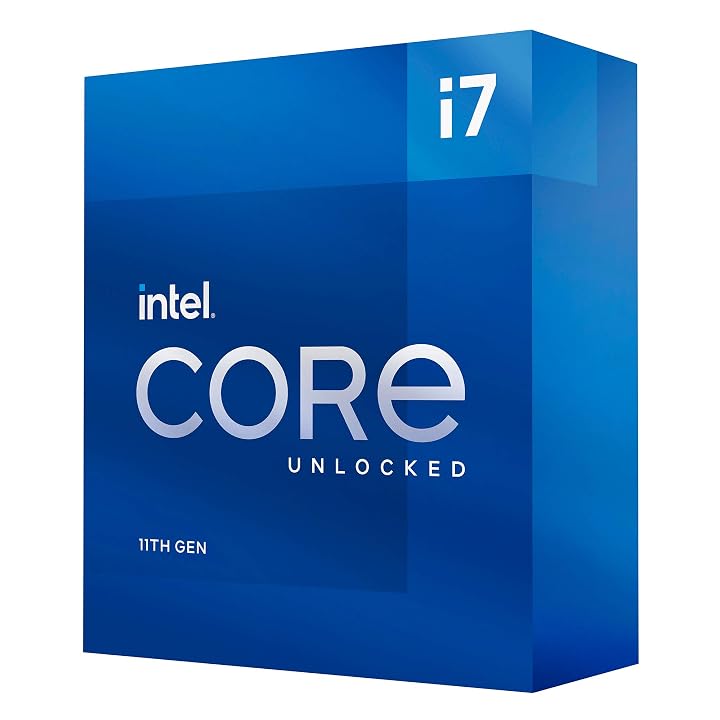


Product photos from the Amazon listing.
The product
Intel Core i7-11700K
Amazon buyer rating
4.8/5
Exceptional
The listing does not publish how many buyers rated it.
Price not listed
- Prime eligible
- Sold by Tech-Mart (S/N Recorded)
Affiliate link. Price and stock come from the listing and change without notice.
As Amazon Associates, we earn from qualifying purchases. This means we may receive a small commission at no extra cost to you if you click through and make a purchase.
The Intel Core i7-11700K desktop processor targets creative professionals, office power users, and PC builders seeking dependable multithreaded capacity without shifting to an entirely new motherboard generation. Built around the LGA 1200 socket, this unlocked eight-core processor operates at a 3.6 GHz base frequency and reaches up to 5.0 GHz via Turbo Boost Max Technology 3.0. For everyday computing, it easily handles demanding multitasking routines, sprawling spreadsheets, local database queries, and background communications. However, because it carries a 125-watt base profile and lacks a bundled heatsink, builders must plan their thermal hardware and case airflow carefully before installation.
This comprehensive guide analyzes how the processor performs during intensive office multitasking, examines its factory specifications, and outlines what is required for adequate cooling and stable power delivery. We also review platform compatibility across Intel 500 and select 400 series chipsets, evaluate PCIe Gen 4.0 data bandwidth, and answer essential workstation integration questions. By assessing its operational characteristics, this review clarifies whether this component aligns with your daily desktop setup or if an alternate platform better matches your efficiency goals.
What You Get With the Intel Core i7-11700K
The retail package adopts a minimalist presentation centered entirely around the bare processor, as Intel does not package a stock cooling unit with unlocked desktop processors. The product listing highlights the following components and core capabilities:
In the box
- Intel Core i7-11700K desktop processor (Model BX8070811700K)
- 8 physical processor cores delivering 16 concurrent threads
- Intel Turbo Boost Max Technology 3.0 reaching speeds up to 5.0 GHz
- 16 MB of installed secondary cache memory
- PCIe Gen 4.0 interface support for modern graphics and storage
- Intel Optane Memory technology support
- LGA 1200 socket interface architecture
- Retail box documentation (the listing does not specify bundled software)
- No thermal solution included in the box
Key Specifications
Specifications
- Processor Model
- Intel Core i7-11700K (BX8070811700K)
- Physical Cores
- 8
- Concurrent Threads
- 16
- Base Clock Frequency
- 3.6 GHz
- Maximum Turbo Frequency
- Up to 5.0 GHz
- Cache Memory Installed
- 16 MB
All 11 specifications
- Thermal Design Power
- 125 watts
- Processor Socket
- LGA 1200
- Chipset Compatibility
- Intel 500 Series and select Intel 400 Series
- PCI Express Support
- PCIe Gen 4.0
- Supported Platform
- Windows 10
Quoted from the product listing.
Multitasking Performance in Daily Desktop Workstations
When planning an intel core i7-11700k workstation setup, daily performance depends heavily on the processor core and thread allocation under load. Featuring 8 physical cores and 16 concurrent threads, the chip handles diverse software environments smoothly. A 3.6 GHz base clock provides reliable operational speed across day-to-day office utilities, while Turbo Boost Max Technology 3.0 automatically directs priority threads up to 5.0 GHz on favored cores. For users managing browser sessions with dozens of open tabs alongside active project management tools, the intel core i7-11700k multitasking performance remains fluid and responsive.
In demanding professional workflows, deploying the intel core i7-11700k for productivity involves evaluating how its 16 MB secondary cache interacts with system memory during data manipulation. In contrast to modern hybrid designs like an intel i7 processor that balances distinct performance and efficient cores, this chip provides eight symmetrical cores. This architectural symmetry delivers predictable thread scheduling across business intelligence suites, database queries, and media encoding jobs, preventing sudden latency spikes when background tasks execute concurrently.
Creative applications such as image processing and batch file exports also benefit from these 16 execution threads. Users can compile complex code libraries or render raster graphics in the background while conducting uninterrupted video conference calls or writing documentation. Furthermore, because this unlocked processor permits frequency tuning, desktop users with adequate power infrastructure can extract steady throughput across prolonged work shifts, although the factory boost profiles already deliver substantial responsiveness out of the box.
Cooling Requirements and Thermal Management
Managing heat is one of the most critical aspects of configuring this processor in a daily work environment. Operating with a 125-watt base rating, the chip generates noticeable thermal output, particularly when Turbo Boost Max Technology 3.0 pushes clock rates toward 5.0 GHz. Because the listing makes clear that no thermal solution is included, system builders must procure a separate cooling setup. Meeting the intel core i7-11700k cooling requirements demands an effective heatsink, such as a substantial dual-tower air cooler with multiple heatpipes or a 240mm liquid cooling radiator.
In a home or corporate office, acoustic comfort is an essential consideration. An undersized cooler will force cooling fans to spin at high speeds under moderate processing loads, creating intrusive desk noise that disrupts focus. Selecting a cooling solution with ample thermal capacity allows fans to operate at lower RPMs during routine document editing, web browsing, and administrative tasks, keeping noise levels low. Ensuring your desktop chassis provides unhindered intake ventilation and dedicated exhaust fans further prevents hot air from lingering around sensitive motherboard components.
Inadequate cooling leads directly to thermal throttling, wherein clock speeds drop back to protect internal silicon integrity. While everyday desktop productivity rarely pushes all eight cores to their limit simultaneously, sustained workloads like batch rendering or archive compression will expose cooling deficiencies quickly. Builders transitioning from high-end parts such as the intel i7 13700k know that sustained boost performance across modern multi-core chips always requires deliberate cooling planning, and this 11th Gen processor is no exception.
Motherboard Compatibility and Hardware Integration
Hardware compatibility determines how seamlessly this chip integrates into an existing setup. Built for the LGA 1200 socket, core i7-11700k lga 1200 compatibility encompasses Intel 500 series motherboards and select Intel 400 series boards. Users seeking to drop this processor into an existing 400 series motherboard, such as a Z490 or H470 model, must verify compatibility with their motherboard vendor. In most instances, updating the motherboard BIOS to the latest manufacturer firmware is necessary before installing the processor to ensure proper system initialization.
Platform functionality also hinges on native i7-11700k pcie 4.0 support. Moving from PCIe Gen 3.0 to PCIe Gen 4.0 doubles data throughput across supported lanes, benefiting high-performance solid-state drives and modern graphics hardware. In office setups focused on video editing, large dataset management, or local virtual machines, Gen 4.0 storage cuts file loading and export transfer durations considerably. However, taking full advantage of PCIe 4.0 bandwidth requires a motherboard—such as an Intel 500 series board—engineered with Gen 4 signal routing from the CPU socket.
Builders should also weigh motherboard longevity when planning their desktop configuration. Because the LGA 1200 platform does not accommodate newer socket architectures like an intel i5 14600k, buying an LGA 1200 motherboard today represents a closed upgrade path. However, for workstation owners who already possess a functional LGA 1200 system and want to upgrade from a slower 10th or 11th Gen CPU without replacing their motherboard or RAM, this component serves as a direct and capable upgrade path.
Power Consumption and Long-Term Operating Demands
Operating a workstation continuously requires an understanding of electrical demands, and the intel i7-11700k power consumption profile reflects its performance-oriented, unlocked architecture. With a factory base rating of 125 watts, power draw remains moderate during light office routines due to aggressive low-power idle states. However, when multitasking demands ramp up and all 16 execution threads are engaged, the processor draws significant current to sustain multi-core boost clocks, raising overall system energy consumption.
To ensure system stability, workstation builders should pair this processor with a well-rated power supply. While the CPU listing indicates a 125W design wattage, auxiliary components such as discrete graphics cards, storage drives, and liquid pumps increase total power draw during peak workloads. A reliable 650-watt or 750-watt power supply provides ample headroom, preventing unexpected reboots caused by transient power spikes. Builders who prioritize lower energy draw and cooler operation in compact chassis environments might alternatively evaluate modest options like the intel core i5-14500 instead.
Motherboard power delivery also plays an influential role in sustained performance. Because this chip pulls substantial power during extended compute jobs, the voltage regulator module (VRM) on the motherboard must deliver clean, stable voltage. Budget motherboards featuring sparse VRM designs and minimal heatsinks can run hot under sustained 125W loads, causing power throttling. Equipping this processor with a motherboard that features sturdy power phases and aluminum VRM heatsinks ensures reliable system stability throughout long daily work sessions.
Intel Core i7-11700K Pros and Cons
Reasons to buy
- 8 physical cores and 16 concurrent threads
- Turbo Boost Max Technology 3.0 up to 5.0 GHz
- PCIe Gen 4.0 expansion bus support
- Unlocked multiplier for frequency tuning
- Intel Optane Memory acceleration support
Reasons to avoid
- No thermal solution included in retail box
- 125W base rating requires capable aftermarket cooling
- Tied to LGA 1200 motherboard socket platform
Check Intel Core i7-11700K on Amazon
Is the Intel Core i7-11700K Worth It
Determining whether is intel core i7-11700k worth it hinges primarily on your existing hardware setup. For users who already own an LGA 1200 motherboard and wish to maximize multitasking throughput, this processor offers an excellent return on investment. With 8 cores, 16 threads, PCIe Gen 4.0 support, and clock speeds reaching 5.0 GHz via Turbo Boost Max Technology 3.0, it elevates daily desktop performance without the expense of purchasing a new motherboard or memory kit.
On the other hand, shoppers assembling an entirely new workstation build from scratch may find less value here. Modern desktop platforms provide newer socket interfaces, greater core counts, and enhanced energy efficiency architectures that provide a longer upgrade runway. In addition, because the processor lacks an included cooler and demands a robust 125-watt power foundation, the added cost of a dedicated heatsink and capable power supply diminishes its appeal for budget-oriented fresh builds.
Ultimately, this processor stands out as a high-value upgrade component for established LGA 1200 systems. Creative professionals, office power users, and developers who require predictable eight-core multithreading and fast single-core clock speeds will appreciate its responsive performance, provided their chassis airflow and cooling hardware are properly matched to its thermal output.
FAQ
Does the Intel Core i7-11700K include a thermal cooler in the box?
No, the product listing explicitly indicates that no thermal solution is included in the packaging. Because the processor features a 125-watt base profile and reaches 5.0 GHz boost speeds, buyers must supply an aftermarket air cooler or liquid cooling setup to maintain safe operating temperatures.
What motherboard socket does the Intel Core i7-11700K require?
The processor requires an LGA 1200 socket. It is fully compatible with Intel 500 series chipset motherboards and select Intel 400 series chipset motherboards, though 400 series boards typically require a BIOS firmware update prior to CPU installation.
Does the Intel Core i7-11700K support PCIe 4.0 solid-state drives?
Yes, the listing confirms native PCIe Gen 4.0 support. When paired with a compatible motherboard that routes Gen 4 lanes, this processor delivers double the bandwidth of PCIe 3.0 for high-speed NVMe solid-state drives and modern graphics cards.
Can the Intel Core i7-11700K be overclocked for higher performance?
Yes, this is an unlocked processor that features an unlocked multiplier. When installed on an overclocking-capable motherboard chipset such as an Intel Z590 or Z490, users can adjust clock ratios and voltages, provided their cooling solution can dissipate the additional heat.
What operating system is specified for the Intel Core i7-11700K?
The listing specifies Windows 10 as the supported platform. The processor functions reliably across standard 64-bit operating environments, distributing multithreaded desktop productivity smoothly across its 8 cores and 16 concurrent threads.
Where these numbers come from
- 192reviews published
- 1,398products with a buyer rating
- 1,374products with listed features
- 84brands covered
Ratings, prices, stock and specifications are read from the Amazon product listing. We do not run lab tests of our own, so a score on this site is the average rating left by buyers, not a verdict from a test bench. Prices change without notice — check the listing before buying.


