Alienware 34 QD-OLED (AW3425DW): Workspace & Gaming Balance
Choosing an ultrawide display for a hybrid workspace requires balancing sharp desktop utility with responsive gaming capabilities. The Alienware AW3425DW targets this exact dual-purpose setup by merging an expansive 34.2-inch curved panel with quantum dot organic light-emitting diode technology. For users wondering whether this specific display fits into a shared work and entertainment environment, the…
8 min read
How we write these. Every figure here — rating, price, stock and specification — is read from the Amazon product listing, not from hardware we tested ourselves. Ratings are the average left by buyers.


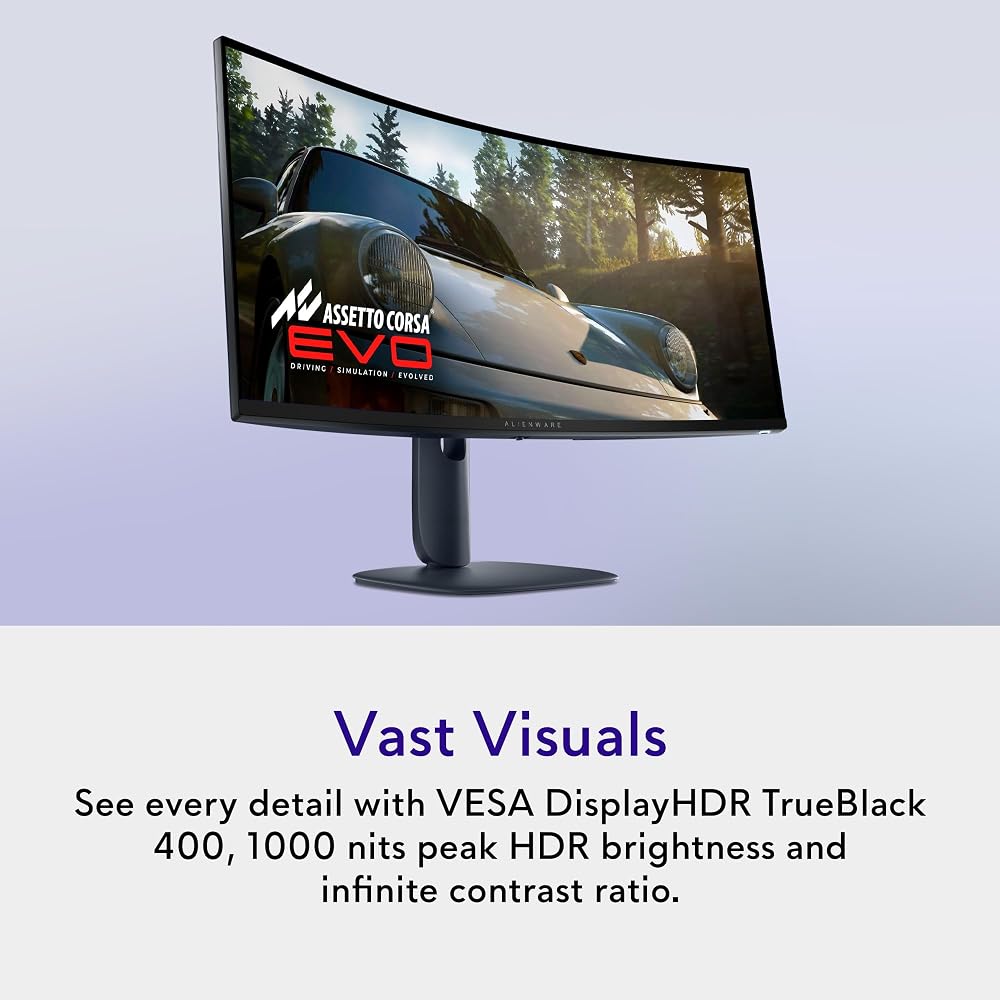
Product photos from the Amazon listing.
The product
Alienware AW3425DW
Amazon buyer rating
4.5/5
Very good
380 ratings
Price not listed
Affiliate link. Price and stock come from the listing and change without notice.
As Amazon Associates, we earn from qualifying purchases. This means we may receive a small commission at no extra cost to you if you click through and make a purchase.
Choosing an ultrawide display for a hybrid workspace requires balancing sharp desktop utility with responsive gaming capabilities. The Alienware AW3425DW targets this exact dual-purpose setup by merging an expansive 34.2-inch curved panel with quantum dot organic light-emitting diode technology. For users wondering whether this specific display fits into a shared work and entertainment environment, the short answer is that its combination of high color accuracy, rapid 240Hz motion handling, and ultrawide screen space makes it a potent centerpiece for both productivity and high-tier visual tasks, provided your workstation can accommodate its physical dimensions and your workflow aligns with OLED characteristics.
In this comprehensive Alienware AW3425DW review, we examine how the display integrates into daily office routines and gaming sessions without relying on unverified claims. We explore the manufacturer specifications, analyze text legibility and daily window management, outline the physical desk footprint and ergonomic implications, and evaluate overall value across different user profiles to help you make an informed buying decision.
What You Get With the Alienware AW3425DW
The Alienware AW3425DW package delivers an ultrawide visual experience centered on QD-OLED display engineering, factory color calibration, and multi-platform sync compatibility. According to the manufacturer listing, the core features and specifications include the following elements:
In the box
- Expansive 34.2-inch WQHD QD-OLED curved panel featuring a native resolution of 3440 x 1440.
- Gentle 1800R screen curvature designed to wrap visual content into the natural peripheral field.
- Rapid 240Hz refresh rate paired with an ultra-low 0.03ms response time for blur-free motion.
- Wide color coverage providing 99.3% DCI-P3 gamut reproduction alongside factory-calibrated Delta E<2 color accuracy.
- High-contrast visual performance certified for VESA DisplayHDR TrueBlack 400 with 1000 nits peak HDR brightness and a 1,500,000:1 contrast ratio.
- Comprehensive adaptive sync support including NVIDIA G-SYNC Compatible, AMD FreeSync Premium Pro, and VESA AdaptiveSync standards.
- Matte screen finish engineered to diffuse ambient room lighting and mitigate harsh glare.
Key Specifications
Specifications
- Screen Size
- 34.2 inches
- Panel Technology
- QD-OLED (Quantum Dot OLED)
- Native Resolution
- 3440 x 1440 (WQHD Ultra Wide)
- Aspect Ratio
- 21:9
- Refresh Rate
- 240Hz
- Response Time
- 0.03ms
All 15 specifications
- Curvature
- 1800R
- Color Gamut & Accuracy
- 99.3% DCI-P3, Delta E<2
- Contrast Ratio & HDR
- 1,500,000:1, VESA DisplayHDR TrueBlack 400, 1000 nits peak HDR
- Brightness
- 250 nits typical
- Pixel Pitch
- 110
- Viewing Angle
- 178 degrees
- Item Dimensions
- 31.71"D x 9.13"W x 21.84"H
- Item Weight
- 20 pounds
- Power Consumption
- 36.7 watts
Quoted from the product listing.
Desk Footprint and Physical Ergonomics
Planning an effective Alienware 34 QD-OLED desk setup begins with assessing the physical realities of a 34.2-inch ultrawide chassis. The listing outlines item dimensions of 31.71 inches in depth, 9.13 inches in width, and 21.84 inches in height, alongside a total weight of 20 pounds. Because curved ultrawide monitors carry substantial mass forward, ensuring your desk surface provides adequate depth is essential so the screen does not sit uncomfortably close to your typing position or crowd out your keyboard and desk accessories.
The Alienware 34 curved monitor ergonomics benefit significantly from its 1800R curvature. Rather than presenting a flat horizontal plane that forces your eyes to refocus when shifting glance from the center to the outer margins, an 1800R curve forms a gentle arc matching the natural sweep of human vision. This design keeps edge windows within an accessible focal range, reducing excessive neck panning during extended computing sessions. Furthermore, the 178-degree horizontal and vertical viewing angles ensure consistent luminance across the full width of the display.
Workstations with integrated monitor arms or compact tabletop surfaces must account for the 20-pound weight of the assembly. If you plan to decouple the monitor from its included base, verify that any third-party mounting solution can support an ultrawide chassis of this scale. When placed on a standard deep desk, the curvature helps reclaim usable corner space around the peripheral edges, making it easier to integrate desktop audio, note pads, and secondary input gear without visual obstruction.
Text Clarity and Office Productivity
Evaluating the Alienware AW3425DW office use requires looking closely at how its 3440 x 1440 WQHD resolution behaves across daily enterprise software. With a 21:9 aspect ratio, the display gives users approximately 33 percent more horizontal workspace than a conventional 16:9 widescreen. This allows two full-sized documents or three tall browser columns to sit side by side without overlapping, eliminating the need for a secondary monitor frame dividing your visual field.
When considering the Alienware 34 QD-OLED text clarity, the panel features a pixel pitch of 110. For desktop productivity such as reading code, adjusting spreadsheets, and scanning long documents, this pixel density renders legible interface elements at standard operating viewing distances. The matte screen finish plays a major functional role here, scattering reflections from overhead lighting fixtures and office lamps that might otherwise cause eye strain on glossy reflective surfaces during daylight working hours.
Using the Alienware 34 QD-OLED for productivity provides significant workflow efficiency for creative tasks and complex multitasking. The factory-calibrated color profile of Delta E<2 combined with 99.3% DCI-P3 gamut coverage means designers and video editors can rely on predictable color fidelity directly out of the box. Coupled with a moderate power consumption rating of 36.7 watts, the display operates efficiently during long workdays without producing excessive heat across the desk surface.
Motion Performance and Hardware Integration
The headline technical feature of this monitor is its Alienware 34 QD-OLED 240Hz refresh rate, paired with an instantaneous 0.03ms response time. In high-speed visual applications, this combination practically eliminates motion blur and ghosting trails. Pixel transitions on QD-OLED panels occur almost instantaneously compared to traditional LCD panels, ensuring that rapid camera pans and high-velocity gameplay maintain pin-sharp edge definition.
To take full advantage of a 3440 x 1440 resolution operating at 240Hz, your underlying computer hardware must be capable of driving demanding bandwidth across modern display outputs. Users pairing this display with capable desktop builds like the alienware aurora act1250 will find that the integrated adaptive synchronization standards—including NVIDIA G-SYNC Compatible, AMD FreeSync Premium Pro, and VESA AdaptiveSync—prevent screen tearing and frame stuttering when output frame rates fluctuate under heavy system loads.
Those operating from performance portable workstations, such as the acer – predator helios neo 16s ai gaming laptop, can utilize the expansive screen real estate via compatible display cables to create a seamless docking station experience. While gamers seeking extreme refresh rates might occasionally look toward specialized alternatives like the alienware 34 280hz qd-oled gaming monitor – aw3426dw, the 240Hz threshold on the AW3425DW delivers top-tier fluid performance that saturates the requirements of nearly all modern titles.
Visual Accuracy and Contrast Performance
Beyond speed, the Alienware 34 QD-OLED specs emphasize pure visual fidelity through organic light-emitting diodes enhanced by quantum dot layers. Because each pixel emits its own light independently, the display achieves an infinite contrast ratio, listed formally at 1,500,000:1. In real-world viewing, this produces absolute black levels without the gray backlight bleed or haloing artifacts common on traditional LED-backlit displays.
High dynamic range performance is certified under VESA DisplayHDR TrueBlack 400, capable of hitting up to 1000 nits peak HDR brightness for highlights and specular reflections. This dynamic headroom allows dark scenes in media and games to maintain nuanced shadow details while bright explosions or sunbeams stand out with vivid intensity. For creators working on color-critical grading, the 99.3% DCI-P3 color gamut ensures expansive tonal representation across wide color spaces.
Standard desktop brightness is rated at 250 nits. In controlled home office environments and moderately lit rooms, this luminance level provides comfortable viewing for everyday software applications. However, users placing their desk directly opposite large, unshaded windows may find that 250 nits in standard dynamic range requires managing ambient sunlight with window blinds to maintain optimal contrast and perceived visual punch.
Alienware AW3425DW Pros and Cons
Reasons to buy
- Fluid 240Hz refresh with 0.03ms response
- Rich 99.3% DCI-P3 gamut coverage
- Infinite contrast with DisplayHDR TrueBlack 400
- Spacious 3440 x 1440 ultrawide desktop
- Broad G-SYNC and FreeSync adaptive sync
- Comfortable ergonomic 1800R curvature
Reasons to avoid
- Modest 250 nits typical SDR brightness
- Substantial 20-pound total chassis weight
- Requires significant physical desk space
Check Alienware AW3425DW on Amazon
Is the Alienware AW3425DW Worth It
Determining whether the Alienware AW3425DW is worth it depends entirely on your daily routine and workload distribution. If your objective is to build a high-performance workstation that transitions effortlessly between complex multi-window multitasking during the day and elite-level gaming at night, this display delivers an exceptional balance of features. Its 240Hz refresh rate, 0.03ms response speed, and broad adaptive sync support offer top-tier gaming fidelity, while the 21:9 ultrawide geometry and factory-calibrated color accuracy provide practical utility for productivity and content creation.
Conversely, buyers whose daily tasks consist exclusively of static text editing, basic data entry, or accounting software in bright, sunlit rooms may not fully exploit the strengths of this display. For purely static office duties, the 250 nits typical SDR brightness and the inherent care required for OLED panels with prolonged unchanging interface elements make standard backlit LCD panels a more conventional alternative. The listing does not specify specialized text-optimization modes beyond its standard pixel pitch of 110.
For enthusiasts and creative professionals who want a single, clutter-free monitor setup capable of delivering true blacks, stunning HDR highlights, and seamless motion without maintaining two separate screens, the Alienware AW3425DW stands out as a well-engineered, highly capable ultrawide solution.
FAQ
What is the native resolution and aspect ratio of the Alienware AW3425DW?
The Alienware AW3425DW features a native WQHD resolution of 3440 x 1440 with an ultrawide 21:9 aspect ratio, delivering substantial horizontal workspace compared to standard 16:9 monitors.
Does the display support variable refresh rate technologies?
Yes, the listing confirms comprehensive adaptive sync support, including NVIDIA G-SYNC Compatible, AMD FreeSync Premium Pro, and VESA AdaptiveSync to eliminate tearing across various graphics cards.
What screen curvature does this monitor feature?
The monitor uses an 1800R curvature, creating a gentle arc across its 34.2-inch panel that aligns with human visual ergonomics to keep peripheral screen edges comfortably in view.
What are the color specifications and HDR certifications?
The panel delivers 99.3% DCI-P3 color gamut coverage, factory-calibrated Delta E<2 accuracy, VESA DisplayHDR TrueBlack 400 certification, and a peak HDR brightness of up to 1000 nits.
What is the typical brightness and screen finish?
The display has a typical brightness of 250 nits and comes equipped with a matte screen finish designed to disperse ambient glare from indoor lighting.
Where these numbers come from
- 192reviews published
- 1,398products with a buyer rating
- 1,374products with listed features
- 84brands covered
Ratings, prices, stock and specifications are read from the Amazon product listing. We do not run lab tests of our own, so a score on this site is the average rating left by buyers, not a verdict from a test bench. Prices change without notice — check the listing before buying.


